For a typical B2B SaaS website with a CMS, Webflow charges 25 USD per month for the Premium site plan, billed annually and excluding tax. If your marketing team needs its own roles, a workspace and seats come on top. With two people in marketing, the example below comes to 55 USD per month.
The pricing page lists site plans, workspaces and seats in separate tables, which is why many teams underestimate the total. Below you will find each cost item with worked examples and the places where you can save.
We also run an honest comparison against a custom build. Hosting and security cost money there too, they just rarely show up in the budget.
How much does Webflow cost per month?
A website without a CMS starts at 15 USD per month on the Basic site plan, and a website with a CMS at 25 USD on the Premium site plan. With access for two people in marketing, the example below comes to 55 USD per month.
| Site plan | billed annually | billed monthly | for |
|---|---|---|---|
Starter | 0 USD | 0 USD | Testing on a webflow.io address, 2 pages, 50 CMS items |
Basic | 15 USD | 25 USD | Website without CMS on your own domain, up to 300 pages |
Premium | from 25 USD | from 39 USD | CMS with 20,000 items and 40 collections, site search, from 50 GB bandwidth |
Team (platform plan) | 2,500 USD | annual contract only | Growing teams with Localize, approval workflows and SLA |
Prices per website and month. All prices in this article: USD, excluding tax, as of 14 October 2026. Sources: Webflow pricing page and Webflow Help Center on the plan changes.
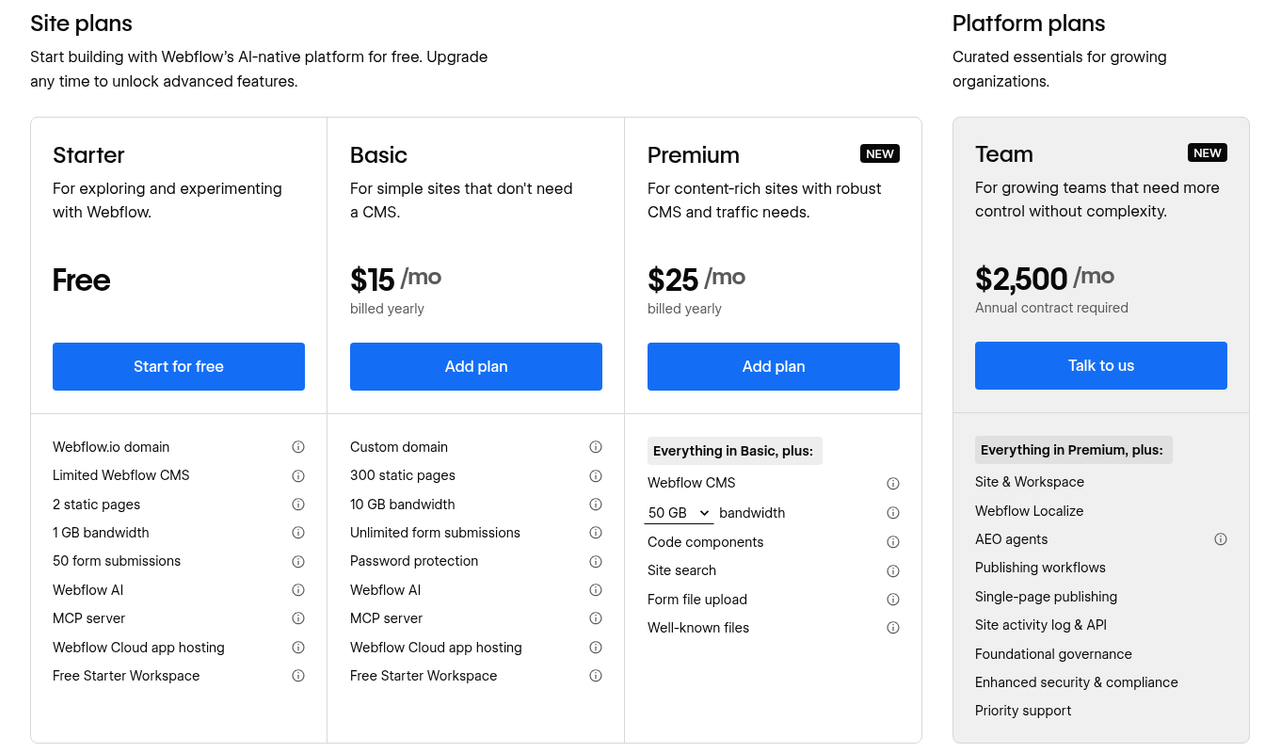
Screenshot of the Webflow pricing page: the site plans on the left, with the Team plan listed separately as a platform plan on the right (as of 16 October 2026). Source: Webflow pricing page.
How the Team plan fits in: Team is a bundled platform plan. It includes the website, workspace, ten seats and features such as Localize and approval workflows in one annual contract. Basic and Premium only cover the website, and you add the workspace and seats separately. Compare the Team plan with the sum of site plan, workspace plan, seats and Localize. It usually becomes interesting once several teams work with approvals and an SLA.
For online stores, Webflow offers separate Ecommerce plans, which we do not cover here. For a marketing website, the site plan alone is rarely enough. As soon as two people in marketing should maintain content themselves, you also need two Limited seats. You do not need a paid workspace plan for this, because the seats can be added to the free Starter workspace plan as well.
The math: 25 USD for Premium plus two Limited seats at 15 USD each comes to 55 USD per month, or 660 USD per year excluding tax.
What you actually pay for with Webflow
Webflow bills three things separately: the site plan per website, the workspace with seats per person, and optional add-ons. Which of these layers you need depends on who works on the website. Most misunderstandings about Webflow pricing come from seeing only the site plan on the pricing page first.
Site plan: the website itself
As soon as your blog, customer stories or use cases come from a CMS, you need Premium. Basic is enough for websites made up of static pages only. For a SaaS website, Premium is therefore the realistic standard.
A site plan always covers exactly one website. Every microsite and every campaign page that runs as its own Webflow project needs its own plan.
Workspace and seats: the team
Every workspace includes a Full seat for the owner and free reviewer seats that let colleagues view and comment. If people should maintain content or build new pages from existing components, they need the Content Editor or Marketer role. These roles require one Limited seat per person, which according to the pricing page you can add to any workspace plan, including the free Starter. The Core workspace plan at 19 USD per month adds code export and shared libraries, among other things. You only need the Growth workspace plan at 49 USD per month if people should only access specific websites or you want to control who can publish.
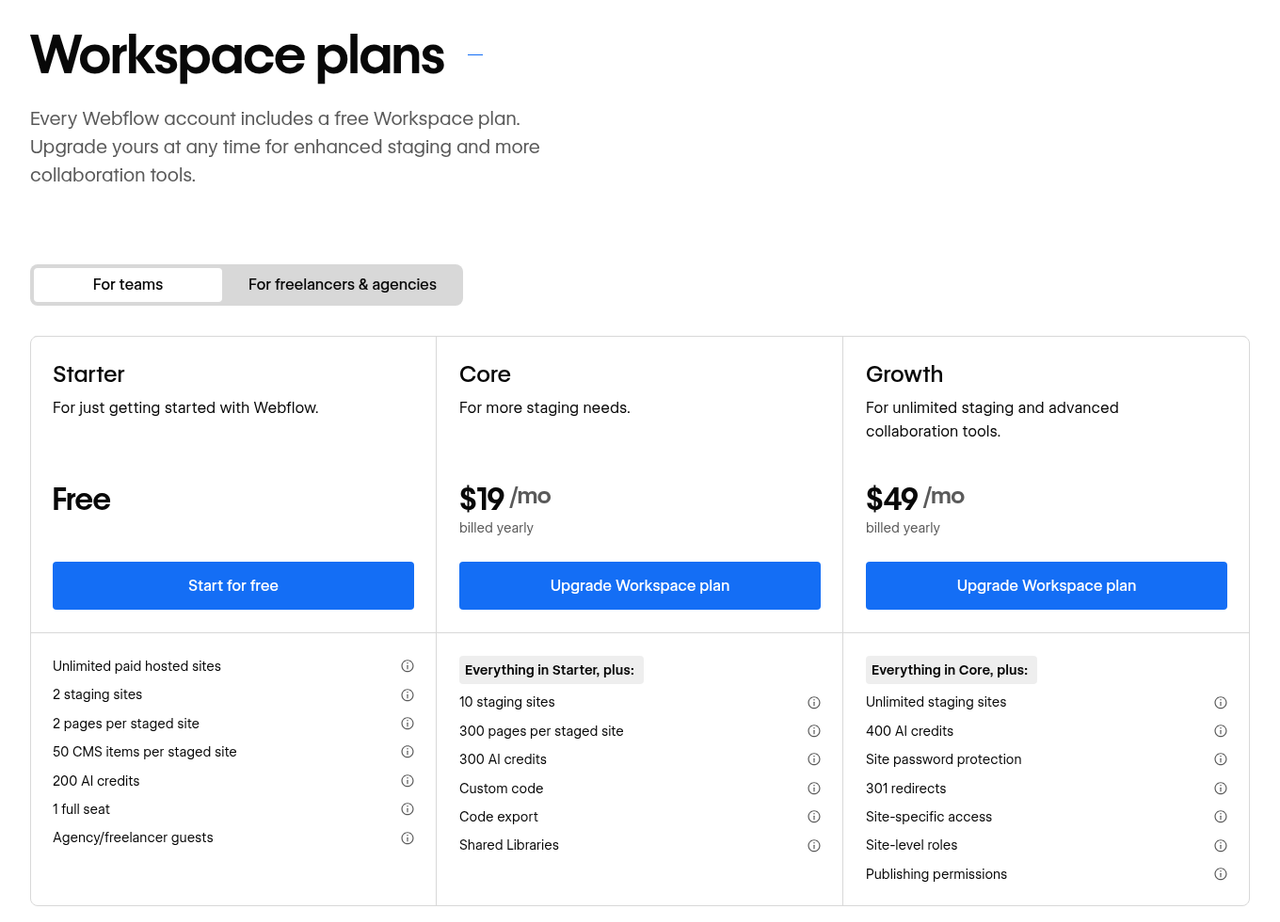
Screenshot of the Webflow pricing page: workspace plans for teams, with Starter free of charge (as of 16 October 2026). Source: Webflow pricing page.
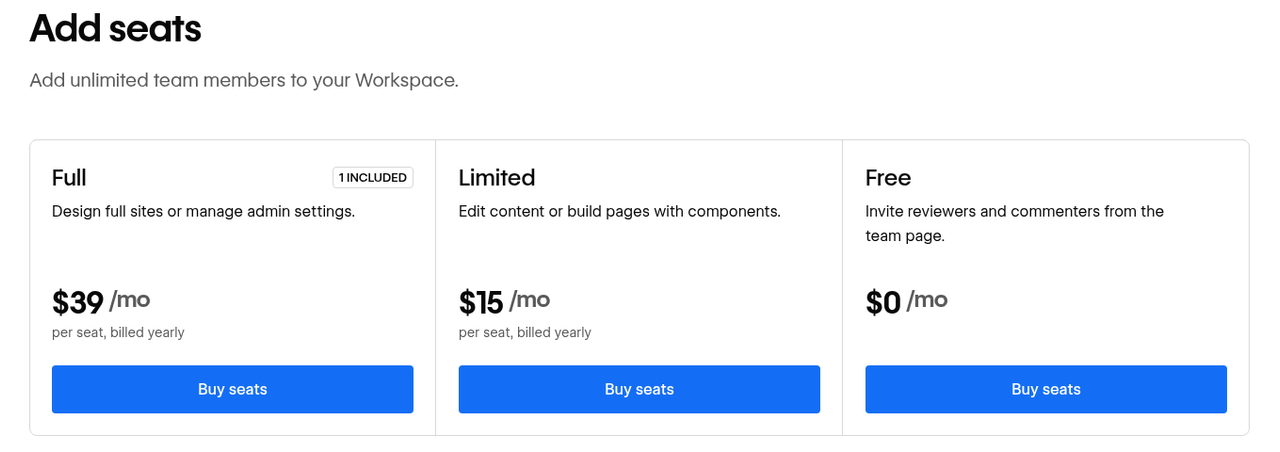
Screenshot of the Webflow pricing page: seats are added on top of the workspace plan (as of 16 October 2026). Source: Webflow pricing page.
| Seat type | Price per month (annual) | Typical person | Use |
|---|---|---|---|
Full | 39 USD | Design or Webflow development | Change layout, structure and components |
Limited | 15 USD | Content or marketing management | Maintain content and, depending on the role, build pages from components |
Reviewer (Free) | 0 USD | Management, product, subject-matter experts | View and comment |
Source: Webflow: Seats, roles, and permissions and pricing page.
Assign seats based on what a person does. Anyone who only approves pages does not need a paid seat, even if they run the department. If an agency manages the website in its Agency workspace, up to three client seats per website are free for your team.
Add-ons: only when needed
Add-ons only pay off once there is a concrete trigger. The most important ones for marketing websites:
- Localize from 9 USD per month (Essential, 1 to 3 additional languages, 10,000 words per month), as soon as a second language comes in.
- Optimize from 299 USD per month for A/B testing and personalization, only worthwhile with enough traffic for reliable results.
- Analyze from 9 USD per month for visitor analytics directly in Webflow.
- AI credits: 20 USD per month for 2,000 additional credits if your team uses the AI features heavily.
Additional bandwidth is also an add-on. We explain when you need it in the section on later costs.
What Webflow hosting includes
The site plan includes managed infrastructure: hosting on AWS with Cloudflare's CDN, automatically renewed SSL certificates, DDoS protection and restore points for backups. Webflow handles platform updates and security patches, so your team does not have to.
| Feature | in the site plan (Basic, Premium) | only in the Team or Enterprise plan |
|---|---|---|
Hosting and CDN | AWS with Cloudflare CDN | same |
SSL/TLS | automatic, TLS 1.2+, HSTS | custom certificate (Enterprise) |
DDoS and bot protection | included, with rate limiting | same |
Backups | restore points, unlimited on paid plans | same |
Login | two-factor authentication | SSO and SCIM (Enterprise) |
Uptime SLA | standard terms without a percentage | Team: 99.90% app, 99.00% hosting; Enterprise: 99.99% |
Approvals | no | approval workflows and activity log (Team) |
Sources: Webflow Hosting, Webflow Security, Backups in the Help Center, pricing page.
You remain responsible for whatever you add to the website. That includes tracking and chat scripts, form integrations with third parties, cookie settings and who has access to the workspace. Webflow maintains the platform, and reviewing your own extensions stays with you.
For companies in Germany and the EU, data protection is usually the first question. Webflow stores customer data in the US and is certified under the EU-U.S. Data Privacy Framework. According to its Privacy FAQs, Webflow provides a data processing agreement to all customers regardless of plan. Webflow is also certified to SOC 2 Type II and ISO 27001. Still, align the setup with your data protection officer, because this article is not legal advice.
Which costs come later
Ongoing extra costs usually come from more traffic, additional languages, more people on the team or monthly billing. On top of that come taxes and the possibility that Webflow changes its plans.
Bandwidth
Premium starts at 50 GB of bandwidth per month. You buy more bandwidth as an add-on, for example an extra 50 GB for 20 USD per month billed annually (30 USD monthly); the largest tier with an extra 2.45 TB costs 974 USD per month. Large videos and uncompressed images drive usage. Our recommendation from client projects: embed videos through a video service and optimize images before uploading, before you buy more bandwidth.
Monthly billing
With monthly payment, Basic costs 25 instead of 15 USD and Premium 39 instead of 25 USD. Webflow itself advertises savings of up to 40% with annual billing. Paying monthly therefore only makes sense for transition periods, such as during a relaunch. In return you stay flexible, because you only commit for one month at a time.
Taxes and currency
Webflow lists its prices in USD and adds VAT at checkout unless a valid VAT ID is on file. Add your VAT ID in the workspace (Webflow: Sales tax). Because prices are in dollars, your budget in euros moves with the exchange rate.
Plan changes
New site plans have applied since 13 May 2026, and the former CMS and Business plans were merged into Premium. Existing websites switch at their next renewal from 29 June 2026, and websites in Freelancer and Agency workspaces from 16 November 2026. According to Webflow, some customers will pay less afterwards and some more; in one example with 150 GB of bandwidth, the annual price rises from 59 to 65 USD per month. Check your bandwidth usage over the past months before your renewal.
Three typical setups and where you can save
For most B2B SaaS marketing teams, the Webflow costs alone come to roughly 650 to 2,000 USD per year with annual billing, excluding tax. Only the Team plan or very high traffic moves the numbers into a different range. You save the most through annual billing and the right seat types.
| Setup | Items | per month | per year |
|---|---|---|---|
A: small marketing team, one language | Premium site plan: 25 USD Starter workspace: 0 USD Limited seats: 2 × 15 = 30 USD | 55 USD | 660 USD |
B: growing team with in-house design | Premium site plan: 25 USD Growth workspace: 49 USD Full seat: 1 × 39 = 39 USD Limited seats: 3 × 15 = 45 USD Localize Essential: 9 USD | 167 USD | 2,004 USD |
C: several teams, approvals, SLA | Team plan: 2,500 USD including 10 seats and Localize | 2,500 USD | 30,000 USD |
Worked examples with annual billing.
Where you can save without creating problems
- Bill annually: This is the biggest single lever once your setup is in place.
- Assign seat types by task: Approving works with free reviewer seats, maintaining content with Limited seats. Only people who change the design need Full seats.
- Choose the workspace plan you need: The free Starter is enough for Limited seats. You only need Growth for per-site permissions and publishing approvals.
- Basic for websites without a CMS: A single event or campaign page without a blog gets by with 15 USD per month.
- Merge microsites: Every separate website needs its own site plan and its own maintenance. If content overlaps, one shared presence with subpages is often cheaper.
- Optimize media: Compressed images and externally hosted videos keep you within the included bandwidth for longer.
- Book add-ons only with a trigger: Optimize only makes sense once enough visitors reach the page for meaningful tests.
There is one place where you should not save. If you cut Limited seats and route every change through one person, you save on licenses and pay with waiting time.
Is a custom build with AI really cheaper?
A custom build saves the Webflow license, and the work for operations and security then falls to your team or a service provider. Above all, the time it takes marketing to get a change live appears in no quote.
For first drafts and simple websites, AI tools noticeably reduce the effort today. How much of that remains on more complex projects depends on scope and implementation quality. But the real bill only starts after launch. We also build websites with custom code ourselves, so this section is about which items belong in your budget.
Hosting and infrastructure
The licenses for a custom build can actually be cheaper than Webflow. Vercel Pro costs 20 USD per month per developer seat, and Sanity has a free plan and costs 15 USD per seat on the Growth plan. You may not use Vercel's free Hobby plan for a company website, though, because it is restricted to non-commercial projects.
The difference lies in the work no pricing page shows. With a custom build, someone on your team or a service provider handles deployments, dependency updates, monitoring and the response to an outage. A contractual uptime SLA is only available on the Enterprise plans of Vercel, Netlify and Sanity. Compare license plus operating time with the Webflow license, and ask for an estimate of the operating time in hours per month.
Security costs
With a custom build, all security tasks stay with you: keeping dependencies and servers up to date, closing vulnerabilities, securing forms and responding to incidents. That takes ongoing time from your own team or a maintenance contract with a service provider.
With Webflow, the platform takes care of all of that. Updates, hosting security, SSL, DDoS protection and backups are included in the site plan, so you plan for neither staff nor a maintenance contract.
Opportunity costs
Every copy change or new landing page that needs a development ticket delays campaigns and ties up development time that the product is missing. These costs appear on no invoice. You notice them when a campaign launch waits for a new use case page that is only scheduled for the next sprint.
At Converia, we see the opposite effect after the relaunch. New pages there now go live in a few hours instead of days, because the team no longer needs development for them. The team fills part of the content through the Webflow MCP, using AI directly from a chat.
When a custom build is still the better choice
A custom build fits if a development team already looks after the website or the website is tightly connected to the product. Requirements that go beyond a marketing website also point toward custom code. In that case, use the following table as a checklist for your budget.
| Task | with Webflow | with a custom build |
|---|---|---|
Hosting and CDN | in the site plan | license with the host, setup by you |
SSL and DDoS protection | in the site plan | depends on the host, configuration by you |
Backups | in the site plan | you or your service provider |
Platform security updates | Webflow | you or your service provider |
CMS for marketing | in the site plan, roles with a Limited seat | separate headless CMS with its own license |
Page building without development | with a Limited seat and components | only if your team builds it |
Response to outages | Webflow, with SLA from the Team plan | you or your service provider |
Custom scripts and integrations | you | you |
What your website costs in total
The Webflow fees are usually the smallest item. The one-off build of the website comes on top, along with ongoing development by your team or a partner.
Separate the one-off project costs for concept, design, build and migration from the ongoing costs in your budget. You now know the ongoing platform costs: in the small setup A, that is 660 USD per year. Next to that sits the working time for new content and pages. Even a few working days per year cost more internally or externally than this license.
We explain what a relaunch costs as a project in detail in our article on website relaunch costs. If you want to outsource ongoing development after a relaunch to us, you will find our models on the pricing page.