Before your B2B SaaS website goes live, you need a reliable view of what is still open. A changed landing page can leave visitors from active campaigns at a dead end. A demo request can appear to submit successfully without ever reaching sales. This checklist helps you and your team catch those issues before launch and check them again on the live website.
If you lead the relaunch from marketing, your main job is to check that the content reflects your current offering and your campaigns still work. Ask the implementation team to show you the technical test results, such as a tested redirect list. That gives you the evidence to approve the launch without running every technical test yourself.
Website Relaunch Checklist: 16 Checks for Your Team
Use these 16 checks to review the website with your team and agency. For each item, record who will check it and where the result can be found. Mark items that do not apply, such as multilingual checks for an English-only website, so they do not remain open at sign-off.
Before implementation
- Existing conversion paths accounted for: The new website supports the intended paths from active campaigns to a demo or sign-up. Changes to forms and their integrations have been agreed with the responsible teams.
- Pages planned around buyer questions: Each important page has a clear question to answer for the prospect. Use-case pages address a specific task, such as “Create sales proposals”.
- Existing pages and baseline data recorded: Existing URLs have been captured, especially pages with search traffic or active campaigns. Pre-relaunch search traffic and qualified enquiries have been documented for later comparison.
Test on staging
- Main pages checked for accuracy: Product has confirmed the claims about available functionality. Sales has checked whether the pages answer recurring questions from sales conversations and whether the evidence supports each claim.
- Demo or sign-up tested end to end: The test enquiry reaches the correct sales owner, who also receives a notification. For self-serve products, initial product access works. The person responsible for analytics checks the conversion event separately.
- Form errors and consent checked: Invalid inputs trigger clear error messages. Enquiries still go through when optional tracking is declined, while measurement respects the consent choice.
- Content published with marketing permissions: Someone on your team has used their future permissions to change product copy or an existing landing page. The change is visible on staging, including the affected language version.
- Mobile usability and load time checked: Navigation and enquiry forms work on the agreed devices and with a keyboard. The agency has provided a performance report for the homepage and important landing pages, including the corrections needed.
Prepare for launch
- Changed URLs handled correctly: Suitable redirects have been tested for content that has moved or been consolidated. A 404 or 410 status is planned for any page being removed without a useful replacement.
- SEO settings prepared for launch: The agency has checked which search engine restrictions must be removed from the test version. Canonicals and internal links are prepared for the live URLs, along with the XML sitemap.
- Launch approval and rollback agreed: One person approves the launch, and the implementation team is available during the switch. The team has agreed in advance which errors require a fix and when to return to the previous version.
Immediately after launch
- Demo or sign-up confirmed on the live site: The previously tested process works again on the published website. The test contact is marked as a test in the CRM.
- Redirects and language versions checked live: Important old URLs lead to their planned destinations. The agency confirms the SEO settings on the live domain. If the website offers multiple languages, switching languages opens the corresponding page.
After launch
- Critical errors resolved: Errors that prevent enquiries or make important pages inaccessible have been fixed. The affected function has been tested again afterwards.
- Search traffic and enquiries compared: Search traffic to important pages is compared with the recorded baseline. Qualified enquiries or sign-ups are evaluated separately.
- Day-to-day handover completed: Your team has the intended CMS permissions and can maintain the agreed pages independently. A contact has been named for technical changes.
The next sections explain how to assess these checks and which results you need from the agency. The launch section distinguishes between errors that should stop publication and issues that can be fixed later.
Before Implementation: What Stays and What Changes?
Start by comparing the planned relaunch with the website already generating demand today. Active campaigns must still lead to the right offer after the switch. Record which pages will be new and which existing forms or integrations will change as a result.
Account for existing campaigns and enquiries
Review the landing pages used by your active campaigns and follow the path from the ad to the enquiry or sign-up. If a destination URL changes, it needs an appropriate new destination. Before changes to a form or CRM integration are implemented, sales should confirm which information must still come through.
Record the question each important page should answer. A use-case page might address people who want to “Create sales proposals”. An integration page, by contrast, explains whether an existing system can be connected and which data can be exchanged.
In your page plan, record who will check the content for accuracy and what the visitor's next step should be. If the objectives and scope are still open, our website relaunch guide can help you prepare.
Record existing pages and baseline data
Have the existing URLs collected and add their search traffic from Search Console. Also flag landing pages used in active campaigns and content sales regularly shares. That brings important entry points from ads and sales conversations into the plan alongside pages found through organic search.
For every important old URL, record whether the page will stay or continue at a new address. When content is consolidated, the new destination must still answer the original question. For forms and downloads, record where they send visitors or data.
Before the switch, save the figures you will use to assess the relaunch: search traffic for each important page and qualified enquiries or sign-ups. Note the reporting period and the existing conversion definition so that a tracking change does not distort the comparison. Our website relaunch SEO guide explains how technical URL mapping works.
On Staging: Are the Content and Functions Ready?
Use staging, the test version of your new website, to check content and functionality before publication. Marketing assesses whether prospects can find the information they need and take the intended next step. The implementation team tests the technical functionality and shows you the results of the agreed checks.
Do the pages reflect your users' tasks?
Choose one page from each important page type for the content review. The homepage should make clear who the product is for and which problem it addresses. For key claims, also check that the product shown and the supporting evidence are still current.
A use case describes a specific task the user wants to complete, such as “Assign support tickets”. Check whether the relevant page makes that workflow clear and reflects the situation the user is dealing with. “Faster support with AI” names a benefit and a technology, but does not identify a specific task.
The page can then explain how your product helps with that task and what value it provides. For “Assign support tickets”, it could show how a new enquiry reaches the responsible support team. A generic feature overview leaves prospects unsure whether the product supports their own workflow.
Have product check factual claims, especially about available functionality and integration requirements. Sales should review whether recurring questions from conversations are answered. On an integration page, for example, it may be important to explain whether data moves in both directions or only one.
Follow the demo or sign-up through to completion
Start the test on a landing page and submit a clearly labelled test demo request. Ask sales to check in the CRM that the required information arrives and the right person is notified. The person responsible for analytics checks separately whether the agreed conversion event is recorded. That verifies both the handling of the enquiry and its measurement.
For self-serve products, test sign-up with the product team through to the first usable account. Include any transition from the website to an app on another domain. Then test an error, such as an invalid input, and check whether the user can correct it without starting again.
For a Webflow form, ask the implementation team to show you which submission destinations are configured. Webflow documents several form destinations. A success message in the browser alone does not confirm that the enquiry reached the CRM.
Also test the enquiry with optional tracking declined. The enquiry should still arrive, while analytics and marketing tags respect the consent choice. The person responsible for the consent setup confirms which events may be recorded in each case.
Can marketing maintain the agreed content independently?
Ask someone on your team to change product copy using their future permissions and publish the change to staging. If marketing is expected to build new landing pages, that must also be possible with the prepared components. In Webflow, the available actions depend on the assigned role and permissions.
For a multilingual website, check the same content in both affected language versions. Switching languages should open the corresponding page, and its forms must work in the appropriate language. A change to the German page should therefore prompt a check of whether the English version also needs updating.
For Webflow, also have the publishing status of the languages in use checked. A configured language only appears in the automatically generated sitemap once its locale subdirectory has been published.
Check mobile usability and load time
Test the homepage and the landing pages important to your campaigns on the agreed mobile devices. For example, check whether an embedded calendar remains usable and a form error appears next to the affected field. The implementation team also tests keyboard access, including visible focus and a reachable submit button.
For the same pages, ask for a load-time report that identifies the causes of any issues. If a hero video slows the page down, the agency should explain what it will change and what the next measurement shows. Core Web Vitals help assess performance, but do not replace a functional test of the form or calendar.
At Launch: Which Errors Should Stop Publication?
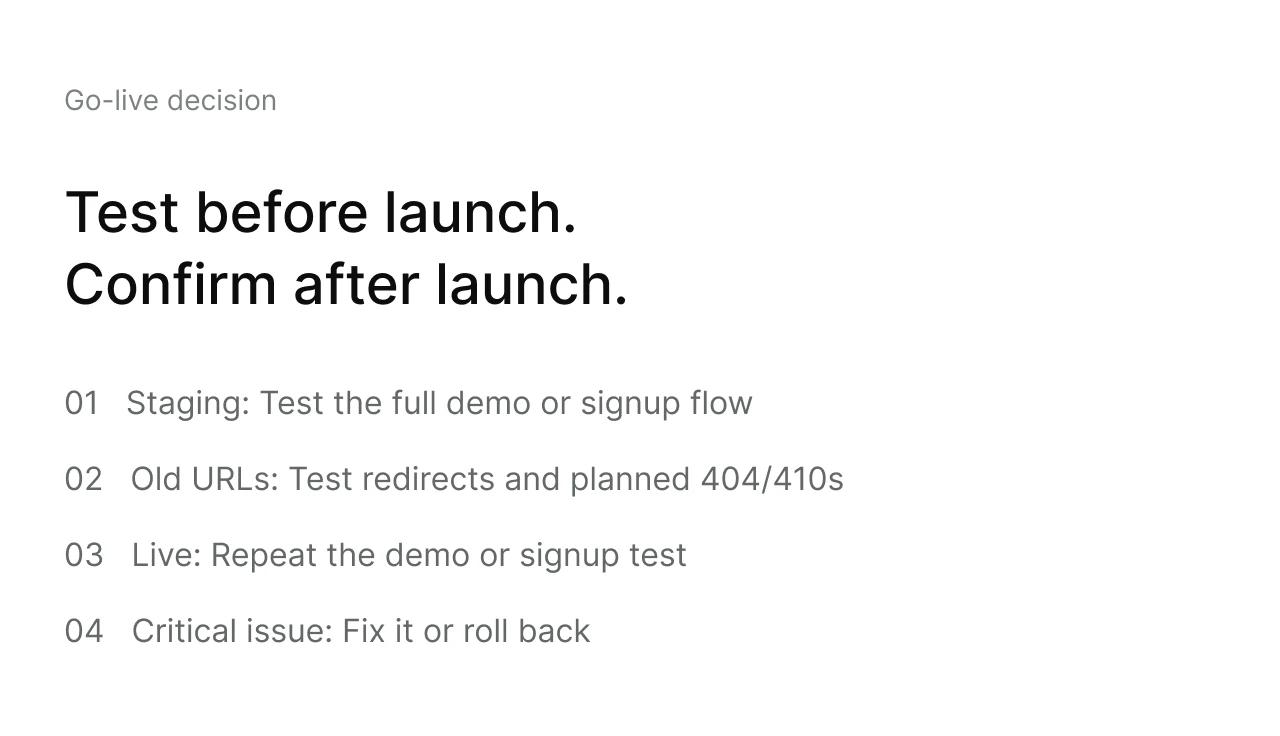
Postpone launch if a required demo request or sign-up fails on staging, or if important redirects are still missing. The removal of search engine restrictions must also be prepared. A minor display issue on a lower-priority page can remain open with a fixed date for correction. Immediately after publication, your team checks whether the approved functions also work on the live domain.
Check the SEO migration and publication settings
A page moving to a new address needs a redirect to the appropriate new content. An existing integration page, for example, should still explain the relevant connection even if it now sits elsewhere on the website. If content is removed without a useful replacement, a 404 or 410 status is appropriate.
Ask to see the mapping of old URLs to new ones together with the test results. Google recommends testing redirects before the move and checking them afterwards. A URL that stays the same does not need an additional redirect.
The implementation team checks the intended launch SEO settings in advance. This includes making sure each canonical points to the correct live URL and internal links contain no test URLs. The XML sitemap must include the intended pages at their final addresses.
Search engine restrictions make sense on staging. For the live website, however, the agency must record which robots rules or noindex directives will be removed. Immediately after the switch, it checks important live URLs to confirm that these pages are accessible and indexable.
When changing CMS, the migration also needs to preserve how existing content is displayed. Open an existing blog post with a table or embedded content and check that both remain readable in the new template. Test a download linked from that post as well, so the published version retains the supporting material alongside the text.
Who makes the decision on launch day?
Name one person who approves the launch and decides what happens if a critical error occurs. The implementation team must be available during the switch. Agree with the agency in advance which errors can be corrected immediately and under what conditions the previous version will be restored.
After publication, your team repeats the prepared demo or sign-up test on the live domain. In parallel, the agency checks important redirects and the actual SEO settings. If several languages are affected, include switching between the published versions.
After Launch: What Do You Monitor and Who Takes Over?
After launch, you need a clear process for issues that only become apparent in day-to-day use. Agree who you report an issue to and who will fix it. Assess trends in search traffic and qualified enquiries separately from this immediate bug fixing.
First hours: fix failures
Report an error with the affected URL and a short description of how to reproduce it. If a demo request has not arrived, include when it was submitted and which test email address was used. After the fix, the responsible person confirms the same test again on the live website.
Following weeks: compare search traffic and enquiries
Compare search traffic to important pages in Search Console with the figures saved before the relaunch. Choose comparable periods and account for seasonal differences. Where addresses have changed, consider the new page together with its previous URL.
Separately, check qualified demo requests or sign-ups in the CRM or product. If only analytics conversions have dropped while enquiries are still arriving in the CRM, investigate measurement first. If actual enquiries have also fallen, changes to campaigns or content may be contributing factors.
Search results can fluctuate after major changes while Google processes the website again. For pages showing unusual changes, first have the team check that they are reachable and indexable. Our article on website relaunch SEO can help with further diagnosis.
Complete the handover for day-to-day use
At handover, record which tasks marketing will handle independently and which changes need support. Your team needs its own accounts with the right permissions and instructions for the components actually in use. Assign responsibility for any open items that will remain after the project ends.
If more pages or language versions are planned for later, the project scope should make the required work clear. Our article on website relaunch costs explains which decisions affect the effort involved.