Squarespace is enough for a first, lean SaaS website that a small team wants to launch quickly and cheaply. Webflow pays off once several people in marketing should build pages from centrally maintained building blocks without admin rights to the whole site. The same applies when structured content such as case studies or integration pages joins the blog.
This comparison is written for founders and marketing leads at B2B SaaS companies, not for shops or portfolios. We build websites with Webflow, so we have a stake in the answer. That is why we also show where Squarespace comes out ahead.
Webflow vs. Squarespace at a glance
Squarespace is a website builder with templates and fixed page types; Webflow is a visual editor with a CMS you structure yourself. Both host your website, so neither leaves you dealing with servers or updates. Most of the differences come down to how much structure you can define yourself.
Comparison table for B2B SaaS marketing
The right-hand column shows which platform comes out ahead for a SaaS marketing team, and under which condition. Webflow leads on five criteria, Squarespace on two, and one is a tie.
Criterion
Squarespace
Webflow
Advantage for B2B SaaS marketing
Page building and design system
Templates, grid editor (Fluid Engine), saved sections as copies
Components whose changes apply on every page
Webflow, if building blocks should stay consistent across many pages
Roles and publishing
Website Editor cannot create pages; approvals only in Enterprise
Limited seats with the Marketer and Content Editor roles
Webflow, if several people build pages without admin rights
CMS structure beyond the blog
Fixed page types such as blog, portfolio, store
Custom collections with custom fields
Webflow, once more than the blog needs structure
Multiple languages
Duplicate pages by hand or add Weglot as a separate subscription
Localize in the editor, hreflang set automatically
Webflow, if new pages regularly go live in both languages
CRM connection and custom code
Code Injection from Core, HubSpot via embed or Zapier
Custom code, HubSpot app, API
Webflow; a tie for a single tracking pixel
SEO and size limits
SEO basics; at most 1,000 pages, fixed content types
SEO basics; custom content types, up to 20,000 CMS items on Premium
Tie for small websites
Selling and appointment booking
Store in the website plan; scheduling and newsletters as add-on subscriptions in the same account
Usually requires separate tools
Squarespace
Running costs
From €216 a year (Core)
From USD 660 a year (Premium and 2 Limited seats)
Squarespace
Quick recommendation by situation
This mapping applies to typical SaaS marketing websites run by a small team. If several rows apply to you, let the task your team does most often decide.
If you need …
Better fit
a first website the founder maintains
Squarespace
landing pages that several marketers build without admin rights
Webflow
case studies or integrations as CMS content
Webflow
a website in two languages with new pages added regularly
Webflow
selling or appointment booking in the same system
Squarespace
the smallest budget for one language
Squarespace
Webflow and Squarespace in detail: eight criteria compared
For a SaaS website, what matters most is how quickly your team gets new pages live and whether the structure grows with the product. These two questions are also where Squarespace and Webflow differ most.
Page building and design system
Squarespace is faster for standard pages; Webflow is better for a team that wants building blocks to stay consistent across many pages. In Squarespace, you pick a template and arrange content in the Fluid Engine grid editor. According to the Help Center, you can save sections you like and reuse them on other pages. Every inserted version is a copy, though: if you change the original section, the other instances stay as they were. In Webflow, someone builds components once, such as a hero section or a customer quote. Change a component, and it changes on every page that uses it.
Why this matters for your team: with a handful of static pages, the difference barely registers. If you publish campaign or comparison pages every month, in Squarespace you update every copy one by one as soon as a call to action or the logo strip changes. On the other hand, getting started in Webflow takes more effort, especially for the person who builds the component system.
Advantage for B2B SaaS marketing: Webflow, if building blocks should stay consistent across many pages. For a few static pages, Squarespace is enough.
Roles and publishing in the team
In Squarespace, your marketing team can only create new pages if it gets administrator rights to the entire website. From the Core plan you can invite unlimited contributors (two on the Basic plan), but according to the Squarespace Help Center, the Website Editor role cannot add new pages or change the design. Only the owner and administrators can add pages.
Screenshot: Squarespace Help Center, website permission roles (as of October 2026). Source: support.squarespace.com.
Approval workflows, where someone reviews drafts before they go live, are only available in Squarespace Enterprise, and Squarespace lists its price only on request. In Webflow, each person in marketing gets a Limited seat for USD 15 a month. With the Marketer role, they build pages from existing components; with the Content Editor role, they maintain content.
Why this matters for your team: if only the founder maintains the website, permissions hardly matter. If several people build pages, every new page in Squarespace ends up with the few people who have admin rights, or you grant more rights than the task needs. If you also want to control in Webflow who may publish each site, you need the Growth workspace plan for USD 49 a month.
Advantage for B2B SaaS marketing: Webflow, if several people should build pages without admin rights.
CMS structure beyond the blog
Squarespace handles the blog well, but other structured content gets tight. In the editor, you choose from fixed page types, such as blog or store, listed in the Help Center article on collection pages. Squarespace only offers custom content types with custom fields through its developer platform, which means writing your own template code.
On Webflow's Premium plan, you can create up to 40 collections with up to 20,000 items. A collection is a set of content items with the same structure and fields you define yourself. For an integration page, that could be the logo and category, and Webflow generates a separate page from each item.
Why this matters for your team: SaaS websites often grow with case studies or integration pages that all follow the same structure. If you maintain them as individual pages, every change to the structure means manual work on every page.
Advantage for B2B SaaS marketing: Webflow, once more than the blog needs structure.
Multiple languages
Squarespace gives you two ways to add a second language; Webflow manages language versions with Localize in its own editor. In the Help Center, Squarespace recommends the integrated Weglot extension: it translates automatically and creates language versions as subdomains. It also sets the hreflang tags that help search engines serve the right language version. You then edit translations in Weglot rather than in Squarespace. Without Weglot, according to the Help Center, you duplicate every page by hand and translate every text yourself; each language then gets its own menu. Making the translation discoverable in search engines is also up to you.
Webflow Localize creates language versions as subdirectories, such as /en. Each page exists once and gets its own text per language, which you translate in the same editor. According to the Help Center, Webflow sets the hreflang tags automatically.
Why this matters for your team: the manual approach costs no extra subscription but doubles the maintenance, because you make every structural change on both pages. Weglot takes that work off your hands but costs a separate subscription for a typical SaaS website, and your texts live in two places. Localize also costs extra in Webflow; we calculate both options below under "Running costs". If new pages regularly go live in both languages, Webflow keeps the maintenance effort lowest.
Advantage for B2B SaaS marketing: Webflow, if new pages regularly go live in both languages. For a few pages that rarely change, the manual approach in Squarespace is enough.
CRM connection and custom code
Both platforms support tracking, but Webflow connects more directly to a CRM like HubSpot. In Squarespace, adding custom code such as a tracking pixel requires at least the Core plan, because according to the plan overview, Code Injection is only included from Core. To connect HubSpot, the HubSpot Community usually recommends embedding a HubSpot form or forwarding submissions via Zapier.
Webflow has its own HubSpot app. It embeds HubSpot forms and sends submissions from Webflow forms to HubSpot; it can also turn on HubSpot tracking. On top of that, there is an API and an MCP server for maintaining content automatically.
Why this matters for your team: for many SaaS websites, demo requests are the most important conversion. Every detour between form and CRM is a place where a request can get lost. We compare how closely HubSpot's CMS and CRM work together in Webflow vs. HubSpot.
Advantage for B2B SaaS marketing: Webflow. If you only add a single tracking pixel, both are on par.
SEO and size limits
For SEO, both platforms are equivalent for a small website. In both, you manage page titles and meta descriptions yourself, as well as redirects and the sitemap, and neither ranks better on its own.
When it comes to scale, the two platforms count differently. Squarespace limits the number of pages: at most 1,000 per website, and according to the Help Center, no more than 400 are recommended. Squarespace does not set a limit on posts per blog. Webflow's Premium plan limits CMS items to 20,000. A CMS item is a record in a content type you define yourself, such as a case study, from which Webflow generates a page. Freely designed static pages count separately. So the two numbers can't be compared directly. We deliberately leave out load-time comparisons without our own measurements, because load time depends mainly on images and embedded scripts.
Why this matters for your team: for a website with 30 pages and a blog, none of these limits matter. What counts is whether you can maintain pages with the same structure as a content type of their own. If you plan many pages following the same pattern, for example for integrations or industries, you create them one by one in Squarespace and as items in a collection in Webflow.
Advantage for B2B SaaS marketing: a tie for small websites. Webflow, if many pages with the same structure are planned.
Selling and appointment booking
Squarespace leads here, even though not everything is included in the website price. From the Core plan, you sell products, services and digital content directly through the website. Appointment booking via Acuity Scheduling and newsletters via Squarespace Email Campaigns run in the same account, but each costs its own subscription, billed separately from the website plan, as the Help Center explains for Acuity and Email Campaigns. Neither is included in our cost calculation below.
In Webflow, you usually need separate tools for this, such as a booking tool for demos and a newsletter system. As long as you use these tools anyway, that is not a drawback, but it does mean extra subscriptions and setup.
Why this matters for your team: for many SaaS websites this is secondary, because demo booking and newsletters often already run through the CRM. It becomes relevant if you sell courses or self-service purchases through the website.
Advantage for B2B SaaS marketing: Squarespace, if your website also sells or books appointments and you want to manage everything in one account.
Running costs
Squarespace costs considerably less than Webflow in both scenarios. For a single-language marketing website with two people on the team and tracking in place, we calculate with annual billing, excluding VAT, as of October 2026. Squarespace bills customers in Germany in euros; Webflow bills in US dollars.
Item
Squarespace
Webflow
Plan
Core: 12 × €18 = €216
Premium site plan: 12 × 25 = USD 300
Seats
Contributors at no extra cost
Limited seats: 2 × 12 × 15 = USD 360
Workspace
Not applicable
Starter: USD 0
Total per year
€216
USD 660
We did not use the cheaper Squarespace Basic plan, because according to the plan overview it includes neither Code Injection for tracking nor more than two contributors. Billed monthly, Core costs €24. We explain the Webflow items in detail in our article on Webflow pricing.
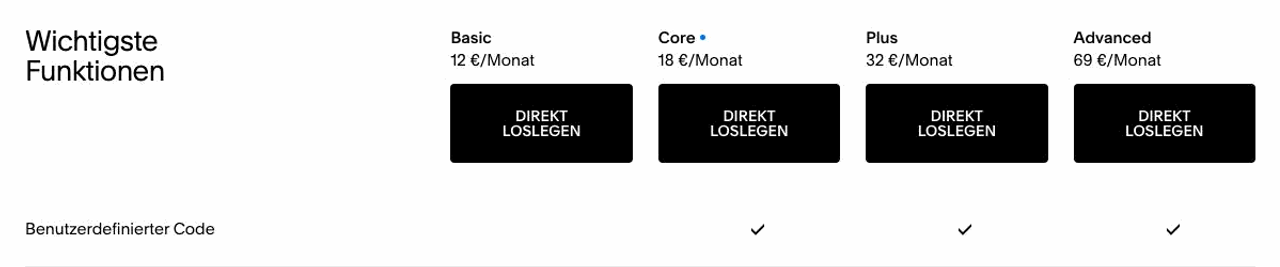
Screenshot: Squarespace pricing page for Germany (German interface), prices per plan and custom code only from Core (as of October 2026). Source: squarespace.com.
With a second language, Squarespace remains cheaper. For Squarespace, we include Weglot, because like Localize it manages language versions automatically. The manual approach costs nothing extra, but you maintain every page twice. For Webflow, we include Localize Essential.
Item
Squarespace
Webflow
Base as above
€216
USD 660
Translation
Weglot Starter: €150 (one language, 10,000 words)
Localize Essential: 12 × 9 = USD 108
Total per year
€366
USD 768
According to Weglot, the word limit applies to all translated words combined and does not renew; beyond it, you need the Business plan for €290 a year. That brings Squarespace to €506 a year, and the gap to Webflow narrows considerably.
Why this matters for your team: with a difference of a few hundred euros a year, in our view the deciding factor is the working time tied to the website. If every new landing page waits for the one person with admin rights, that weighs more heavily for most teams than the difference in license costs.
Advantage for B2B SaaS marketing: Squarespace on price.
Which platform fits your team?
Decide based on your website's next year: who builds new pages, and which content and languages will be added? The two lists summarize when each platform holds up.
Choose Squarespace if …
this is your first website and you are still working on product and audience,
you only need one language,
the blog remains your only structured content,
you want to sell products or digital content through the website and let people book appointments in the same account.
A website builder is often the right choice for a first website. At the latest when your audience changes and the website has to win over larger customers, it is worth taking another look at the platform. Our Kickscale case study shows how a SaaS team outgrew its first Wix website; you'll find the comparison with Wix in Webflow vs. Wix.
Choose Webflow if …
several people in marketing should build landing pages without admin rights to the whole website,
you want to manage case studies or integrations as CMS content,
your website runs in German and English and gets new pages regularly,
demo requests should land directly in HubSpot.
If something on both lists applies, it is usually still open which pages your website will need in a year. List the pages your team wants to build next quarter, and check who would be allowed to create them in Squarespace today.
Conclusion: Squarespace to get started, Webflow for a marketing team that builds on its own
Squarespace is an honest, affordable choice for a small SaaS team's first website, especially if you only need one language and a blog. As soon as several people in marketing should publish their own landing pages without admin rights to the whole website, Squarespace hits its limits on permissions. Maintenance effort also rises with a second language that gets new pages regularly and with structured content beyond the blog.
Webflow costs a few hundred euros more a year and takes more learning during setup. In return, your team then works independently in a platform that grows with the product.
Frequently asked questions about Webflow vs. Squarespace
How much work is it to switch from Squarespace to Webflow?
You can bring over the blog; the other pages are rebuilt in Webflow. According to the Help Center, Squarespace only exports layout pages and one blog as an XML file in WordPress format, while store pages and custom CSS, for example, are left out. In our relaunch projects, migration and redirects are included so that visitors and search engines get from the old URLs to the new pages.
Who owns the website if we switch to Webflow?
Your company owns the website, because the workspace and site plan run through your own Webflow account. Our clients pay for their workspace directly with Webflow, and we get access for the project. You can export your CMS content as a CSV file at any time if you want to switch later.
Is Webflow harder to learn than Squarespace?
For the setup, yes; for day-to-day maintenance, hardly. Whoever builds the component system in Webflow needs a basic understanding of layouts and classes, while Squarespace starts with ready-made templates. Anyone who then builds pages from existing components with a Limited seat gets by with a short introduction.
What do we need to check for GDPR with Squarespace and Webflow?
With both platforms, you use a data processing agreement with the provider: Squarespace offers a Data Processing Addendum, and Webflow has its own Data Processing Addendum as well. You set up the cookie banner and legal notice yourself in both systems; you mainly need a banner for services that require consent, such as tracking. Have your data protection advisor review the setup, because every tool you add can change the assessment.
What alternatives to Webflow and Squarespace are there?
Depending on your team, Framer, Wix, WordPress or HubSpot CMS are also options. Like Squarespace, Framer and Wix are hosted platforms; we cover the differences from Webflow in Webflow vs. Framer and Webflow vs. Wix. HubSpot CMS is closely tied to the HubSpot CRM; read more in Webflow vs. HubSpot. WordPress is open and needs ongoing maintenance; you'll find that comparison in Webflow vs. WordPress.
About the author
Tarik Yayla
Founder @ path digital
Tarik founded path digital with a clear conviction: a good B2B SaaS website starts with strategic positioning. Together with his team, he combines clear messaging, design and Webflow to help companies develop their websites with purpose. Away from website relaunches, he trains for marathons and explores how AI is changing agency work.
Thinking about moving from Squarespace to Webflow? In a strategy call, we show you what needs to be rebuilt during the move and how your marketing team can publish on its own afterwards.
We use cookies and similar technologies to understand how our website is used and improve our website and advertising. You choose which optional cookies to allow. Read our privacy policy
Cookie & storage details
Provider of this website: path digital. No analytics storage is created by scrolling or opening these details. Optional analytics can be declined without restricting the website.
Necessary: your choice
Name / technology
pd_consent_v2 · Local Storage
Provider / purpose
path digital: remembers your consent or rejection after you make a choice.
Duration
Valid for 180 days. We ask again after expiry. Browser storage remains until replaced or deleted.
Necessary: selected language
Name / technology
pd_language · Cookie
Provider / purpose
path digital: remembers German or English only when you explicitly use the language selector. Overrides browser preference on a later direct homepage visit.
Duration
180 days; replaced when you select another language.
Reach measurement without storage: PostHog
Provider: PostHog Inc., USA; EU hosting. Without statistics consent, we count page views, CTA clicks and booking steps and measure load times (Core Web Vitals) cookieless: nothing is stored on your device, and PostHog derives a daily changing, non-reversible identifier on its servers from IP address and browser data. No session recordings or form contents.
Optional: PostHog statistics
With statistics consent, PostHog also uses random visitor and session identifiers in your browser so that visits across several pages and days can be understood together.
Name / technology
ph_phc_u1gZuicUCym1nXYZNBjF0d7KMZm2LnAiHKU30HoiYVk_posthog · Local Storage / Session Storage
Duration
Local Storage has no automatic browser expiry; removed on withdrawal or when expired consent is detected on a visit. Session Storage lasts for the tab session.
Tab identifier
ph_phc_u1gZuicUCym1nXYZNBjF0d7KMZm2LnAiHKU30HoiYVk_window_id · Session Storage · Distinguishes tabs during a session; removed on withdrawal.
Consent marker
__ph_opt_in_out_phc_u1gZuicUCym1nXYZNBjF0d7KMZm2LnAiHKU30HoiYVk · Local Storage
Purpose / duration
Records the SDK opt-in after statistics consent, without a visitor identifier. Removed on withdrawal.
Marketing: Google Ads
Google Ireland Limited, Ireland; processing may also take place in the USA. Measures advertising performance and confirmed bookings and supports advertising attribution. Requires marketing consent. Google Analytics is not used.
_gcl_au, _gcl_aw
Advertising and click attribution · cookies · up to 90 days. The conversion linker requires marketing consent.
Meta Platforms Ireland Limited, Ireland; processing may also take place in the USA. Measures advertising performance and confirmed bookings, and supports remarketing. Requires marketing consent.
_fbp
Browser identifier · cookie · up to 90 days.
_fbc
Associates an ad click with later actions · cookie · up to 90 days; only when an ad click identifier is available.
LinkedIn Ireland Unlimited Company, Ireland; processing may also take place in the USA. Advertising attribution, audience analysis and remarketing. Requires marketing consent.
li_gc
Stores LinkedIn consent · cookie · 6 months.
bcookie
Browser identifier · cookie · 1 year.
lidc
Routes LinkedIn requests · cookie · 1 day.
UserMatchHistory, AnalyticsSyncHistory
Advertising attribution and identifier synchronization · cookies · 30 days.
Snitcher B.V., Netherlands. Identifies companies visiting this website based on the IP address and evaluates their visits. If you enter your email address in one of our forms (booking, download, website audit), Snitcher links it to your visits on this website, including earlier ones, so we can see which pages you viewed. Without marketing consent Snitcher only records the current visit, with no lasting identifier; recognising returning visits and linking your email address require marketing consent.
snitcher_device_id / radar_device_id
Recognizes returning visitors · cookie and Local Storage · 1 year.
snitcher_session / radar_session
Associates page views with a visit · Local Storage · current visit.
snitcher_sn_* / radar_sn_*, spotter_data
Technical visit data for company identification · Session Storage · tab session.
Dealfront Group GmbH, Germany. Identifies companies visiting this website based on the IP address and evaluates their visits. Without marketing consent Leadfeeder only records the current visit and sets no cookie; recognising returning visits requires marketing consent.
_lfa
Recognizes returning visitors · cookie · 1 year; set only after marketing consent.
_lfa_consent, _lfa_test_cookie_stored
Consent marker and cookie support check · cookie · up to 1 year.
Google Tag Manager loads these services only after the corresponding choice. Scrolling does not count as consent. Cookie lifetimes may be shortened by browser settings. Depending on sign-in state and browser restrictions, providers may also use their own domain cookies; their tables above list the details. Withdrawal stops future loading and removes accessible tracking storage on our domain. Cookies on other domains can be deleted in your browser settings.
To withdraw, open “Privacy settings” in the footer and choose “Necessary only”. Further information on processing and your rights: Privacy policy · PostHog Privacy