With Webflow and Wix you can launch a B2B SaaS website with a CMS that several people maintain together. Which system fits depends on how your team will build new pages later on. Webflow pays off once people in marketing regularly build pages from the locked components of a design system. Wix fits as long as a few people with design rights build the pages and the subscription budget matters.
We are a Webflow Enterprise Partner and build websites exclusively in Webflow. That is why we compare both systems against the same eight criteria and say openly where Wix is the better fit.
Webflow vs. Wix at a glance
Wix is a website builder that lets one person without prior knowledge get a website online quickly. Webflow is a visual development platform on which a team builds a website with its own design and a structured CMS, and then extends it on its own. Wix Studio, Wix's professional environment for agencies, moves closer to Webflow on design, so we mention it where the difference matters.
Comparison table
The table summarizes the eight criteria that we explain one by one further down. All prices apply to yearly billing, as of October 2026.
Criterion
Webflow
Wix
Advantage for B2B SaaS marketing
Getting started and learning curve
Learning the layout logic, or someone who sets up the design system
Pick a template and adjust it via drag and drop
Wix, for a fast first version
Building pages and roles
Marketer role builds new pages from components without being able to change the design
Roles for content, structure and design, 5 collaborators on the Core plan
Webflow, if marketing regularly builds new pages
Design and components
Own design system with classes, variables and components
Template-based, Wix Studio with grid and breakpoints
Webflow, Wix Studio comes close
CMS
Collections and dynamic pages, 20,000 items on the Premium plan
Collections and dynamic pages, 4,000 items on the Core plan, 20,000 on the Business plan
Tie
SEO basics
SEO basics fully covered
SEO basics fully covered
Tie
Multilingual
Localize from 9 USD per month
Wix Multilingual built in, automatic translation with a word quota
Tie
Export and lock-in
Code export from a paid Workspace, CMS as CSV
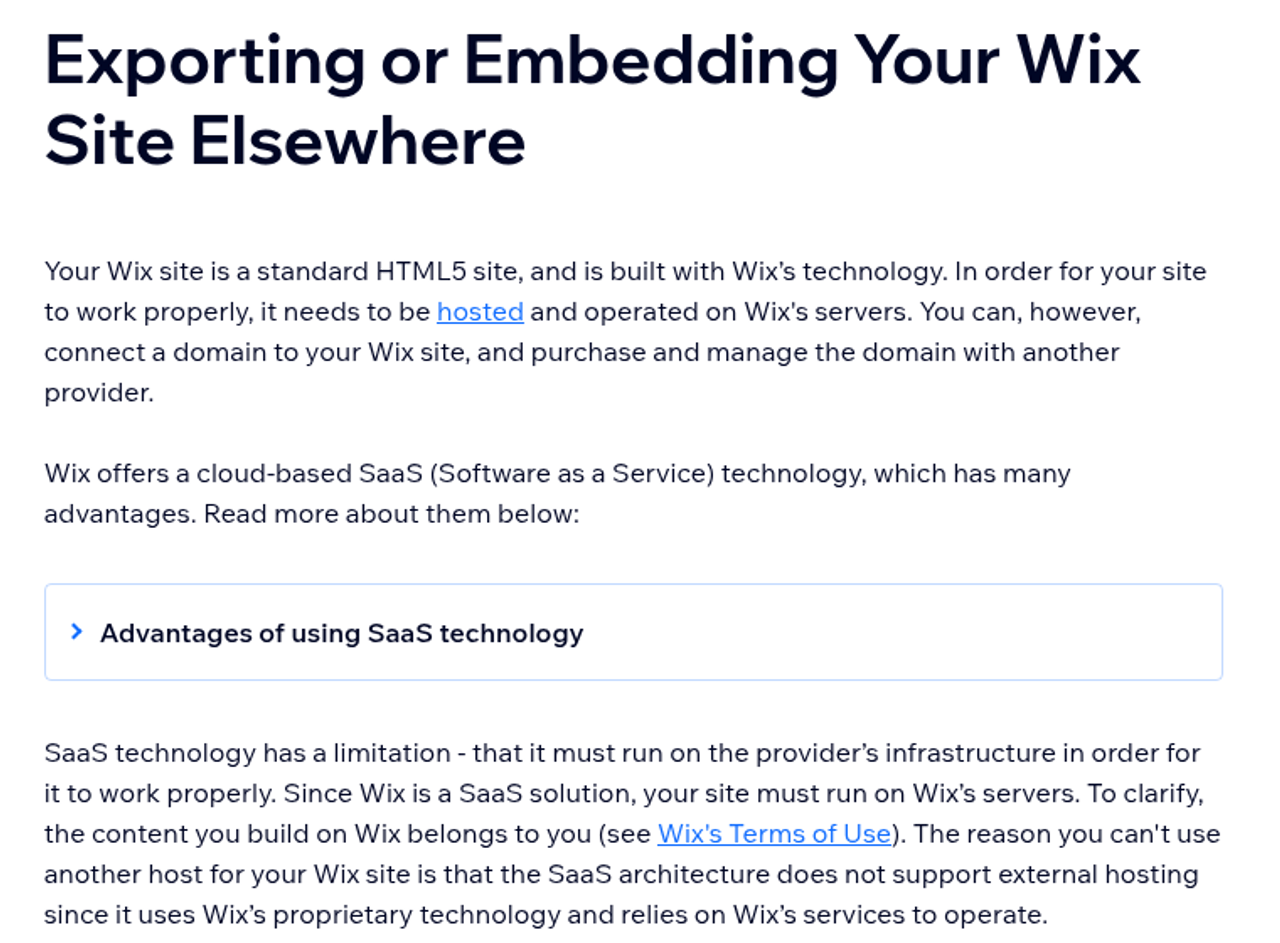
No export, runs on Wix only
Webflow
Running costs
From 25 USD per month with CMS, plus 15 USD per Limited seat
Core plan from 29 USD per month with CMS and 5 collaborators
Wix
Integrations
CRM forms via embed or integration, custom code
App Market and its own marketing tools
Tie
E-commerce
Available
More extensive
Mostly irrelevant for SaaS marketing sites
Quick recommendation by starting point
Which system fits depends less on the feature set than on who builds new pages and how much the website should grow over the next twelve months. If a funding round or a new market is coming up in that period, plan for the bigger website.
If you need …
better fit
a website with 5 to 10 pages that you maintain alone as a founder
Wix
a website that goes live in a few weeks without a design budget
Wix
an agency handover into a familiar Wix environment
Wix Studio
landing pages your marketing team builds itself from locked building blocks
Webflow
use cases, integrations and a blog as structured content
both
German and English with clean maintenance of both versions
both, see costs
a website for larger customers although your messaging is still unclear
clarify your positioning first
Webflow and Wix in detail: eight criteria compared
We compare against eight criteria that decide effort and speed in SaaS website projects. Each criterion ends with our assessment of the condition under which the advantage lies with Webflow or with Wix. Where both are level, we say so too.
Getting started and learning curve
Wix gets a website online fastest. You start with a template and drag elements where you want them, no prior knowledge needed. In Webflow you work with the box model and classes, as developers know them from CSS, so the setup takes some learning or someone who sets up the design system once.
Why it matters for your team: Before product-market fit, your messaging often changes faster than any page structure. At that stage, a website the founder adjusts over the weekend is worth more than a clean design system. Once editors only maintain content, Webflow's learning curve hardly matters for them, because they work with ready-made building blocks.
Advantage for B2B SaaS marketing: Wix, if the first version should go live fast and without a design budget.
Building pages and roles
Both systems separate rights for content and design. In Wix, according to the Wix Help Center, the Content Writer role edits text, links and media and maintains content in existing CMS collections. Wix Studio even assigns rights for page structure, layout and content separately and limited to individual pages. Up to five collaborators work on the Core plan, ten on the Business plan.
The difference lies in building new pages: in Webflow, a designer defines components such as a feature block or a logo bar, plus page templates. With the Marketer role, a Limited seat for 15 USD per month, people in marketing build complete new pages from them, but according to Webflow University they can change neither components nor classes or variables. In Wix, anyone who should create new pages needs the right to edit the page structure. How consistent those pages stay then depends on how carefully templates and sections have been prepared.
Why it matters for your team: This criterion weighs most heavily as soon as more than one person builds new landing pages. Without locked building blocks, after a few months every landing page looks a little different, and someone has to pull the design back in line regularly. If your team mainly maintains text on existing pages, Wix's roles are enough.
Advantage for B2B SaaS marketing: Webflow, if marketing should regularly build new pages without being able to change the design.
Design and components
Wix is template-based: you start with a template and adjust colors and fonts. Wix Studio adds a grid and breakpoints for different screen sizes so agencies can build custom layouts, with custom code if needed. In Webflow you implement your own design system of classes and components that every new page inherits. You define colors and spacing as variables, so a change applies everywhere at once.
Why it matters for your team: For larger customers, your website is often the first hint of how carefully your company works. A consistent design system makes sure the twentieth use case page still matches the homepage. Wix Studio can deliver that too, if an agency builds it that way from the start.
Advantage for B2B SaaS marketing: Webflow, if your brand needs its own design system. Wix Studio comes close.
CMS for blog, use cases and integrations
Both systems have collections, meaning sets of content with the same structure from which dynamic pages are generated. A new integration is then a new item with a logo and description, and its page is created automatically from the template. Wix also offers dedicated CMS roles for people who only maintain content in collections.
The differences are in the limits and in how templates are designed. According to the Wix Help Center, the Wix Core plan allows 4,000 items; for 20,000 items you need the Business plan. Webflow's Premium site plan includes 20,000 items. In Webflow, CMS templates use the same classes and components as the rest of the website, so a design change also covers all dynamic pages.
Why it matters for your team: In SaaS marketing, the page types that grow fastest are those that need many pages with the same structure, such as use cases or integrations. Both systems handle that, as long as these pages are set up as a collection from the start rather than built one by one.
Advantage for B2B SaaS marketing: Tie. Beyond 4,000 items you need the Business plan on Wix.
SEO basics
Both systems cover the SEO basics: custom titles and meta descriptions per page, an XML sitemap, 301 redirects and structured data. A Wix page therefore does not automatically rank worse than a Webflow page. What matters is how carefully your team maintains page structure and internal links.
Why it matters for your team: For AI features such as AI Overviews, Google names no requirements beyond regular SEO. Anyone promising you better visibility in Google or ChatGPT for either system should back that up with measurements.
Advantage for B2B SaaS marketing: Tie. Both cover the basics, and what matters is how your team maintains the site.
Multilingual (German and English)
Wix Multilingual is built into Wix: you translate content manually or automatically and choose whether language versions live in a subdirectory, a subdomain or behind a URL parameter. Automatic translation is limited by a word quota; Wix names no extra cost for the feature itself. With Webflow you add Localize: Essential starts at 9 USD per month, Advanced with localized URLs and images at 29 USD. The price depends on the number of languages.
Why it matters for your team: For a SaaS company from the DACH region with a German and an international market, a second language is almost always part of the website. Both systems handle that. With Webflow the subscription goes up; with Wix you translate longer texts beyond the quota yourself or have them translated.
Advantage for B2B SaaS marketing: Tie. Both handle German and English, the costs just arise in different places.
Export and lock-in
A Wix website cannot be exported or hosted with another provider; it runs on Wix only. Webflow allows code export from a paid Workspace plan and export of CMS content as CSV per collection. Forms no longer work in the exported code, though.
Wix Help Center: a Wix website runs only on Wix servers (20.10.2026). Source: support.wix.com.
Why it matters for your team: With Wix, a change of system always means a rebuild. That is no argument against Wix for a first website. But you should plan for it if it is foreseeable that your website will soon take on a different job.
Advantage for B2B SaaS marketing: Webflow, if you want to keep a later change of system open.
Running costs
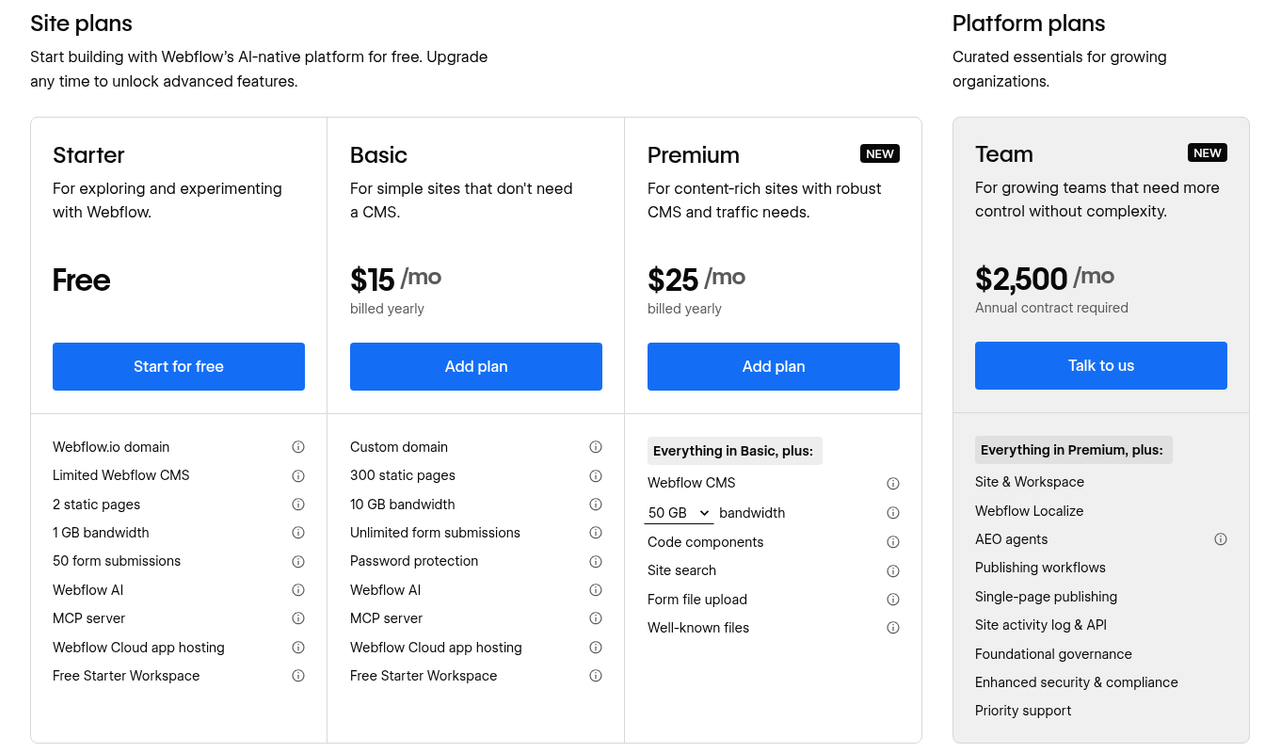
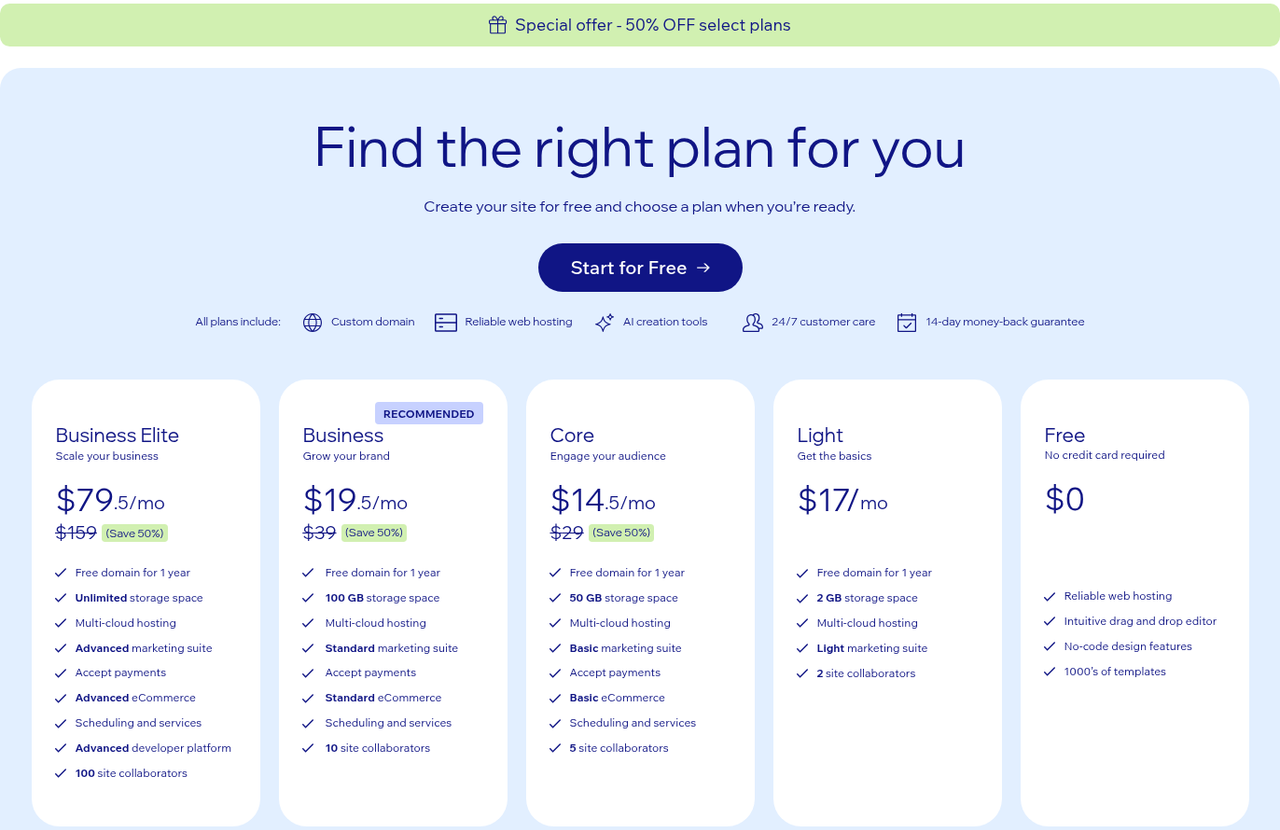
On subscription, Wix is usually cheaper for a SaaS website, because collaborators are included in the plan while with Webflow seats and languages are added individually. The bigger cost block for both systems is building the website. The table shows recurring monthly costs with yearly billing: Wix prices vary by location and tax, Webflow prices are plus tax.
Need
Wix
Webflow
Single-language website without a blog
Light: from 17 USD
Basic: 15 USD
Website with blog and CMS
Light: from 17 USD (1,500 items), Core: from 29 USD (4,000 items)
Premium: 25 USD
The same website in German and English
Core: from 29 USD, Multilingual with no stated extra cost
Premium 25 + Localize Essential 9 = 34 USD
Two content editors
Core: 5 collaborators included
Limited seats: 2 × 15 = 30 USD extra
Webflow site plans with yearly billing (as of October 2026). Source: webflow.com/pricing.
Wix plans in USD with yearly billing (20.10.2026). Wix currently shows a 50 % discount on some plans; the article uses regular prices. Source: wix.com/plans.
How Workspace and seats work together with the site plan in Webflow is explained in our article on Webflow pricing. What building a new website costs is covered in our overview of website relaunch costs.
Why it matters for your team: The subscription difference is usually a few hundred dollars a year and small compared with the build and internal maintenance time. With Webflow, costs rise with the number of editors and languages; the number of pages does not matter.
Advantage for B2B SaaS marketing: Wix, if the subscription budget is tight.
Which CMS fits your team?
Wix fits as long as a few people with design rights build new pages and speed matters more than a fixed design system. Webflow fits as soon as marketing regularly builds pages from locked building blocks. If you recognize yourself in both lists, give more weight to the points that will still hold in twelve months.
Choose Wix if …
you are building the first version of your website before product-market fit.
new pages are mainly created by one or two people with design rights.
your subscription budget is tight.
the built-in marketing tools and apps from the Wix App Market are enough for you.
an agency builds your website in Wix Studio and sets up roles and sections for your team.
Choose Webflow if …
people in marketing should build new pages without getting design rights.
your brand needs a design system in which a change to colors or spacing applies everywhere.
you want to be able to export code and CMS content.
a designer or an agency sets up the system once and your team extends it on its own afterwards.
In return, Webflow asks more at the start: the setup takes learning or outside support. In day-to-day operation, Webflow bills in US dollars, and every editor needs their own seat.
When switching from Wix to Webflow pays off
A new target audience or a second language are good reasons to rework the website. You can do that in Wix too; a change of system is not necessary for it. The switch only pays off when you hit limits that Wix does not resolve:
Marketing should build new pages from fixed components without being able to change the design.
You want to be able to export your website and content instead of being tied to one provider for good.
If neither point applies, rework the website in Wix or Wix Studio. If a rebuild is due anyway, for example because the copy is being rewritten for a new target audience, the change of system carries less weight, because the pages are being created anew regardless. That was the case at Kickscale: the new target audience was the trigger, and the switch to Webflow came with the rebuild.
Because Wix offers no export, your website is rebuilt in Webflow. Text and blog posts including images are transferred, and every old URL gets a 301 redirect to the matching new page. That is the right moment to clarify messaging and page structure at the same time instead of carrying old weaknesses into a new system. How we plan such a move is described in our article on Webflow migration, and what to watch for with rankings in our article on SEO during a website relaunch.
Conclusion
For a SaaS website on which marketing regularly builds new pages from a fixed design system, we recommend Webflow. If a few people maintain the website and the subscription budget matters, Wix is the more pragmatic choice, and Wix Studio closes part of the gap with its own roles.
We build exclusively with Webflow, so our recommendation is not neutral. But you can apply the eight criteria above to your situation without us. If you need many integrations and custom development, it is also worth looking at our comparison Webflow vs. WordPress.
Frequently asked questions about Webflow and Wix
Is Wix Studio a real alternative to Webflow?
For agencies that hand over client websites in the Wix environment, Wix Studio is a serious alternative. It brings a grid and breakpoints for custom layouts and is therefore much more flexible than the classic Wix Editor. If your team wants to extend a design system with CMS-driven page templates on its own, Webflow remains the better tool.
Can we take our Wix content to Webflow?
You transfer text and blog posts via import or by hand; the pages themselves are rebuilt in Webflow, because Wix offers no export of the design. Before the move it is therefore worth taking inventory of which content the new website really needs. Copy written for an earlier target audience is often not worth moving and is better rewritten.
Will we lose our rankings when switching from Wix?
The risk is manageable if every old URL gets a 301 redirect to the matching new page and you check in Google Search Console after launch whether pages drop out of the index. No change of system comes with a guarantee, which is why the mapping of old and new URLs belongs before launch. In our Webflow projects, the complete redirect list is part of the acceptance check.
Does our team need coding skills for Webflow?
Not for maintenance, because content editors work with ready-made components and CMS forms. For the build and the design system you need someone who understands the logic of HTML and CSS. That can be a person on your team or an agency that sets up the system once and onboards your team.
Who pays for Webflow when an agency builds the website?
The Workspace and site plan are registered to your company and paid directly to Webflow. That way, access and data stay with you, even if the collaboration with the agency ends. In our projects it is always set up this way.
What alternatives to Webflow and Wix are there?
For B2B SaaS websites, the main options are WordPress, Framer, HubSpot CMS and Squarespace. Which one fits depends on how much custom development you plan for and how closely the website should be connected to your CRM. The comparisons Webflow vs. WordPress, Webflow vs. Framer, Webflow vs. HubSpot and Webflow vs. Squarespace explain the differences in detail.
About the author
Tarik Yayla
Founder @ path digital
Tarik founded path digital with a clear conviction: a good B2B SaaS website starts with strategic positioning. Together with his team, he combines clear messaging, design and Webflow to help companies develop their websites with purpose. Away from website relaunches, he trains for marathons and explores how AI is changing agency work.
We build B2B SaaS websites in Webflow and, among others, moved Kickscale from Wix to Webflow. As a Webflow Enterprise Partner we take care of positioning, copy, design and build from a single source, including moving your existing content. In a strategy call we look at your current website and tell you honestly whether switching pays off now.
We use cookies and similar technologies to understand how our website is used and improve our website and advertising. You choose which optional cookies to allow. Read our privacy policy
Cookie & storage details
Provider of this website: path digital. No analytics storage is created by scrolling or opening these details. Optional analytics can be declined without restricting the website.
Necessary: your choice
Name / technology
pd_consent_v2 · Local Storage
Provider / purpose
path digital: remembers your consent or rejection after you make a choice.
Duration
Valid for 180 days. We ask again after expiry. Browser storage remains until replaced or deleted.
Necessary: selected language
Name / technology
pd_language · Cookie
Provider / purpose
path digital: remembers German or English only when you explicitly use the language selector. Overrides browser preference on a later direct homepage visit.
Duration
180 days; replaced when you select another language.
Reach measurement without storage: PostHog
Provider: PostHog Inc., USA; EU hosting. Without statistics consent, we count page views, CTA clicks and booking steps and measure load times (Core Web Vitals) cookieless: nothing is stored on your device, and PostHog derives a daily changing, non-reversible identifier on its servers from IP address and browser data. No session recordings or form contents.
Optional: PostHog statistics
With statistics consent, PostHog also uses random visitor and session identifiers in your browser so that visits across several pages and days can be understood together.
Name / technology
ph_phc_u1gZuicUCym1nXYZNBjF0d7KMZm2LnAiHKU30HoiYVk_posthog · Local Storage / Session Storage
Duration
Local Storage has no automatic browser expiry; removed on withdrawal or when expired consent is detected on a visit. Session Storage lasts for the tab session.
Tab identifier
ph_phc_u1gZuicUCym1nXYZNBjF0d7KMZm2LnAiHKU30HoiYVk_window_id · Session Storage · Distinguishes tabs during a session; removed on withdrawal.
Consent marker
__ph_opt_in_out_phc_u1gZuicUCym1nXYZNBjF0d7KMZm2LnAiHKU30HoiYVk · Local Storage
Purpose / duration
Records the SDK opt-in after statistics consent, without a visitor identifier. Removed on withdrawal.
Marketing: Google Ads
Google Ireland Limited, Ireland; processing may also take place in the USA. Measures advertising performance and confirmed bookings and supports advertising attribution. Requires marketing consent. Google Analytics is not used.
_gcl_au, _gcl_aw
Advertising and click attribution · cookies · up to 90 days. The conversion linker requires marketing consent.
Meta Platforms Ireland Limited, Ireland; processing may also take place in the USA. Measures advertising performance and confirmed bookings, and supports remarketing. Requires marketing consent.
_fbp
Browser identifier · cookie · up to 90 days.
_fbc
Associates an ad click with later actions · cookie · up to 90 days; only when an ad click identifier is available.
LinkedIn Ireland Unlimited Company, Ireland; processing may also take place in the USA. Advertising attribution, audience analysis and remarketing. Requires marketing consent.
li_gc
Stores LinkedIn consent · cookie · 6 months.
bcookie
Browser identifier · cookie · 1 year.
lidc
Routes LinkedIn requests · cookie · 1 day.
UserMatchHistory, AnalyticsSyncHistory
Advertising attribution and identifier synchronization · cookies · 30 days.
Snitcher B.V., Netherlands. Identifies companies visiting this website based on the IP address and evaluates their visits. If you enter your email address in one of our forms (booking, download, website audit), Snitcher links it to your visits on this website, including earlier ones, so we can see which pages you viewed. Without marketing consent Snitcher only records the current visit, with no lasting identifier; recognising returning visits and linking your email address require marketing consent.
snitcher_device_id / radar_device_id
Recognizes returning visitors · cookie and Local Storage · 1 year.
snitcher_session / radar_session
Associates page views with a visit · Local Storage · current visit.
snitcher_sn_* / radar_sn_*, spotter_data
Technical visit data for company identification · Session Storage · tab session.
Dealfront Group GmbH, Germany. Identifies companies visiting this website based on the IP address and evaluates their visits. Without marketing consent Leadfeeder only records the current visit and sets no cookie; recognising returning visits requires marketing consent.
_lfa
Recognizes returning visitors · cookie · 1 year; set only after marketing consent.
_lfa_consent, _lfa_test_cookie_stored
Consent marker and cookie support check · cookie · up to 1 year.
Google Tag Manager loads these services only after the corresponding choice. Scrolling does not count as consent. Cookie lifetimes may be shortened by browser settings. Depending on sign-in state and browser restrictions, providers may also use their own domain cookies; their tables above list the details. Withdrawal stops future loading and removes accessible tracking storage on our domain. Cookies on other domains can be deleted in your browser settings.
To withdraw, open “Privacy settings” in the footer and choose “Necessary only”. Further information on processing and your rights: Privacy policy · PostHog Privacy