HubSpot Content Hub suits websites whose content comes straight from CRM data, such as personalized pages or protected areas just for customers. Webflow plays to its strengths when your marketing team regularly needs new page types and building blocks and wants to create them without a developer ticket. For most B2B SaaS teams, the first question is therefore what the website has to do.
In SaaS companies, HubSpot is usually already in place as the CRM. That is why this article compares three options: HubSpot Content Hub (formerly CMS Hub), Webflow without HubSpot, and Webflow with HubSpot as the CRM.
A disclosure up front: we build websites on Webflow and are a Webflow Enterprise Partner. We do not build HubSpot websites. That is why we state explicitly for every criterion when HubSpot is the better choice.
Webflow vs. HubSpot at a glance
Webflow is a standalone website platform, HubSpot Content Hub is the CMS inside a CRM suite. Because SaaS teams usually already run HubSpot as their CRM, the most common answer is a combination: the website on Webflow, contacts and automation in HubSpot. Webflow's HubSpot app connects both systems at no extra cost, and several of our client projects run exactly this way. If you are new to Webflow, our article What is Webflow covers the basics.
Comparison table for B2B SaaS marketing
HubSpot leads on personalization and for large teams. Webflow wins when new building blocks and a distinctive design are needed regularly, and the biggest gap is in costs. The last column names the condition under which an advantage applies.
Criterion
Webflow
HubSpot Content Hub
Advantage for B2B SaaS marketing
Building pages without developers
Pages from components, new components built visually in the Designer
Drag-and-drop pages from theme modules, new modules require HubL development
Webflow if new building blocks are needed often, otherwise a tie
Design and components
Layout and interactions fully customizable
Theme as the base, custom layouts via developers
Webflow
Operations and security
Hosted, platform updates by Webflow
Hosted, platform updates by HubSpot
Tie
SEO and page speed
Meta data, redirects, sitemap
The same, plus SEO recommendations from Professional
Tie
Multiple languages
Localize add-on from 9 USD per month
Unlimited languages included from Professional
HubSpot for many languages, otherwise a tie
Roles and approvals
Site roles from the Growth workspace, Limited seats only edit content
Teams and approval workflows from Enterprise
HubSpot from Enterprise, a tie for small teams
Integrations and CRM connection
Via the HubSpot app, needs to be set up properly once
Built in
HubSpot if nobody maintains the setup, otherwise a tie
Personalization and protected content
Optimize add-on from 299 USD per month, protected pages only via third parties
Personalization with A/B tests and protected pages included from Professional
HubSpot
Running costs
around 660 USD per year
5,400 USD per year with Professional, Starter with two seats around 480 USD
Webflow compared with Professional, Starter only for small websites
Quick recommendation by starting point
Most teams can make their choice based on where they are starting from. Three typical situations point to HubSpot, four to Webflow, one of them in combination with HubSpot as the CRM.
If you need …
the better fit is
new page types and building blocks regularly, without waiting for developers
Webflow
a website that clearly sets your brand apart from competitors
Webflow
a website as a lead source for your existing HubSpot CRM
Webflow with HubSpot as the CRM
content that adapts to CRM data (Smart Content)
HubSpot
protected pages only for registered customers
HubSpot
one vendor for everything, with no second system
HubSpot
a website for a CRM other than HubSpot
Webflow
Webflow and HubSpot in detail: nine criteria compared
The criteria follow the questions a SaaS marketing team asks day to day: who is allowed to publish a new page, and does every lead arrive in the CRM with its source? The last question is about running costs. For each criterion, we state under which condition which system comes out ahead.
Building pages without developers
In both systems, your marketing team assembles pages from ready-made building blocks. In HubSpot, you drag the theme's modules onto the page. In Webflow, you insert approved components. For new copy, images and pages built from existing blocks, you need a developer in neither system.
The difference shows when a building block is missing, such as a new comparison table or a block for customer quotes. In HubSpot, a new module is created by a developer writing HubL, HubSpot's own template language. In Webflow, someone who knows the Designer builds the component visually and defines which content marketing may change in it later. That way, a consistent component system grows along with your needs without every extension becoming a development ticket.
The editions also differ in their limits. According to the HubSpot pricing page, HubSpot Content Hub Starter allows 30 website pages and 30 landing pages, Professional up to 10,000. According to the Webflow pricing page, Webflow Premium allows up to 20,000 CMS items, such as blog posts or use cases.
Why this matters for your team: New use cases and campaigns often need their own formats. If every new building block needs a developer, your marketing team waits on tickets and campaigns launch later than planned.
Advantage for B2B SaaS marketing: Webflow if your marketing team regularly needs new building blocks. If your theme's modules are enough, it is a tie.
Design and components
In HubSpot, you usually start with a theme from the marketplace or a custom-built theme and adjust colors and fonts. With its drag-and-drop modules, your marketing team designs pages on its own, and you only need a developer for layouts or modules the theme does not cover. In Webflow, you design layout and interactions freely and create components with fixed rules that your team then reuses.
This freedom comes at a price: Webflow has a learning curve because the Designer works with concepts from CSS. For day-to-day maintenance, the Editor is enough for your marketing team. New components are built by someone who knows the Designer, either on your team or at an agency.
Why this matters for your team: In SaaS markets, many websites look alike, and a standard theme reinforces that effect. If your website is meant to make your positioning visible, you need design freedom beyond the theme settings.
Advantage for B2B SaaS marketing: Webflow if the website should clearly set your brand apart. HubSpot is enough if a solid theme will do.
Operations and security
Both systems are hosted platforms. Hosting and SSL certificates are included in the price, and the vendor applies platform updates itself. We show how different this looks with a self-hosted system in our comparison Webflow vs. WordPress.
Some responsibility still stays with your team: you maintain your own scripts and integrations in both systems. A badly embedded tracking script slows down the page or violates consent requirements, whatever the platform.
Why this matters for your team: Neither Webflow nor HubSpot requires your own IT team for operations. The choice of platform changes little about your team's workload here.
Advantage for B2B SaaS marketing: Tie.
SEO and page speed
Both deliver what a clean technical SEO foundation needs: custom meta data per page, redirects, automatic sitemaps and freely chosen URLs. HubSpot Content Hub Professional also includes SEO recommendations for individual pages.
In the end, rankings depend on content and site structure. The platform only provides the prerequisites. In both systems, pages are usually slowed down by third-party scripts, such as chat widgets or embedded booking tools.
Why this matters for your team: SEO is rarely the deciding argument when choosing between Webflow and HubSpot. What matters more is whether your team can publish new content quickly, and that depends on how pages are built.
Advantage for B2B SaaS marketing: Tie.
Multiple languages
HubSpot includes multilingual content in the price: according to the pricing page, Starter allows up to 50 languages and Professional an unlimited number. In Webflow, you need the Localize add-on, which starts at 9 USD per month with annual billing. The price rises with the number of language versions, and the next tier, Advanced, costs 29 USD per month.
Why this matters for your team: Many SaaS teams start with German and English and expand to further markets later. With two languages, the extra cost barely matters. With many language versions, the inclusive price speaks for HubSpot.
Advantage for B2B SaaS marketing: HubSpot for many languages, otherwise a tie.
Roles and approvals
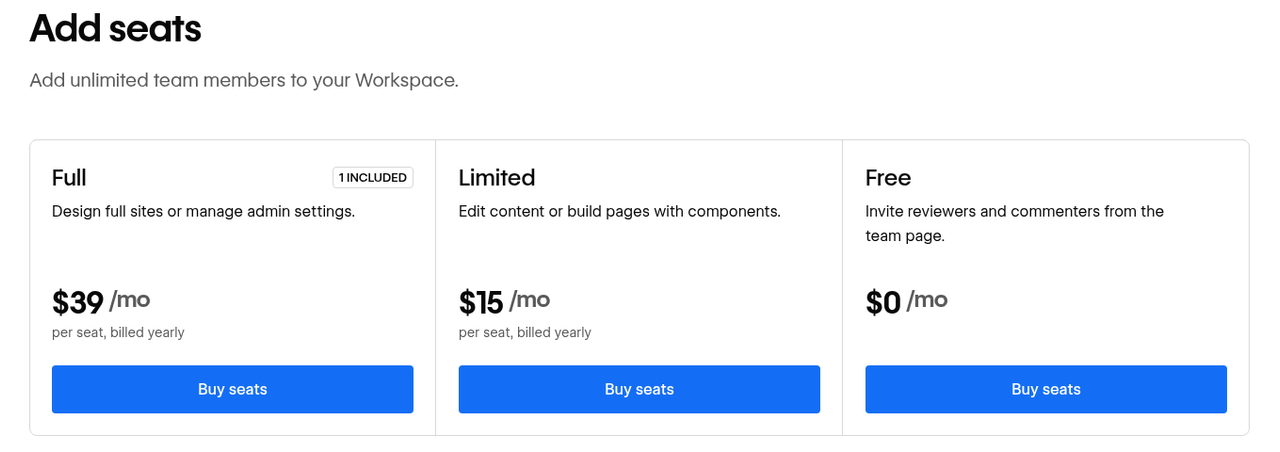
From the Enterprise edition, HubSpot offers teams with separate permissions, so that a country team, for example, only edits its own pages. According to the HubSpot Knowledge Base, approval workflows for pages and blog posts also require Content Hub Enterprise. In Webflow, you assign roles per site and the right to publish with the Growth workspace plan at 49 USD per month. Even in the free workspace, a Limited seat only edits content and builds pages from components, while the design itself stays protected.
Why this matters for your team: A marketing team of two to five people usually does not need separate permissions and approvals, because coordination happens in direct conversation. It becomes relevant when several teams or countries work on one website and not everyone should be able to publish everything.
Advantage for B2B SaaS marketing: HubSpot from Enterprise, a tie for small teams.
Integrations and CRM connection
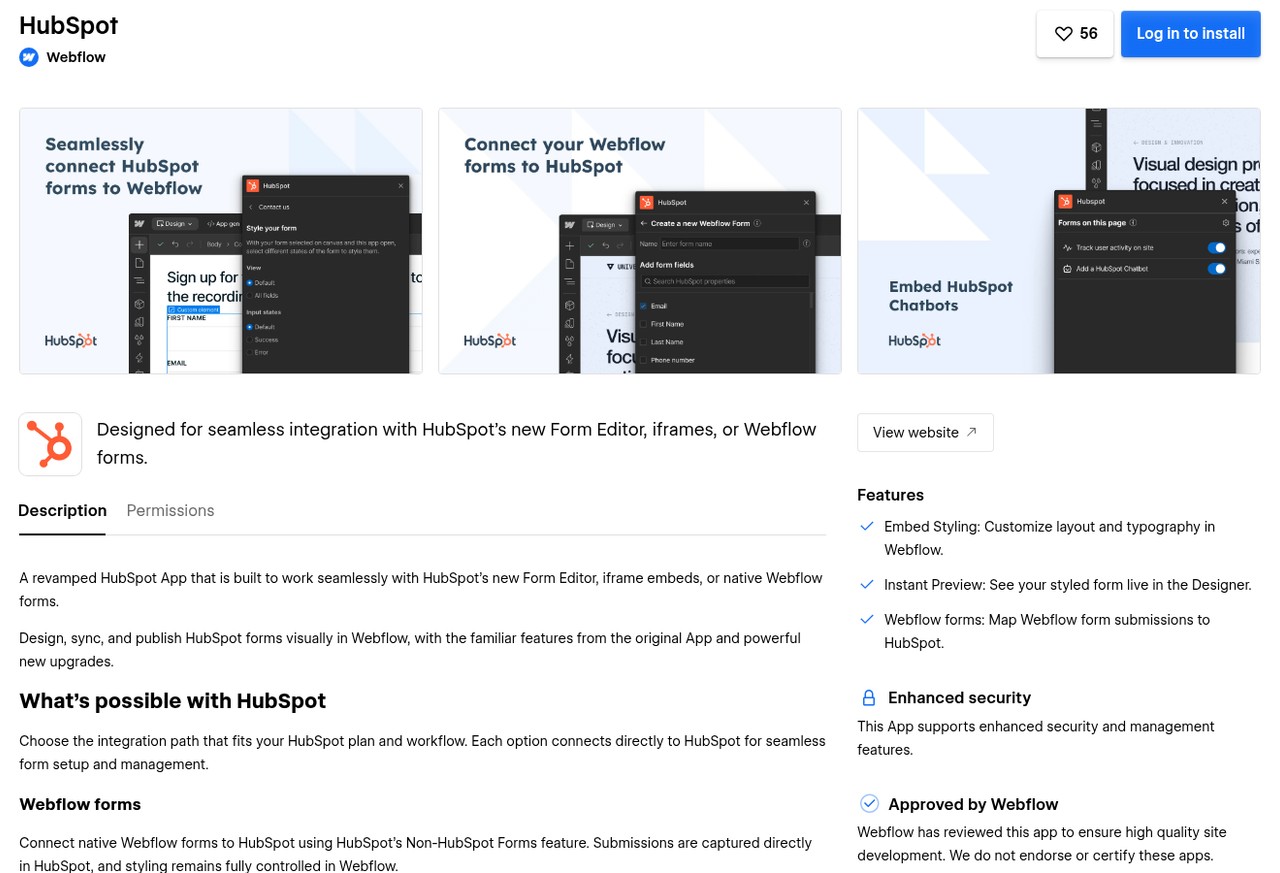
With HubSpot Content Hub, the connection to the CRM is built in, because the website and contact data live in the same system. With Webflow, the HubSpot app connects both sides: it embeds HubSpot forms or sends submissions from Webflow forms to HubSpot. If you want, the app also adds the HubSpot tracking code.
Which route fits depends on your forms. You maintain embedded HubSpot forms entirely in HubSpot, but according to Webflow, the fully customizable developer embed requires Marketing Hub Professional or Enterprise. Webflow forms can be connected to any HubSpot account, but the app only transfers text fields, not dropdowns or checkboxes.
The HubSpot app in the Webflow Marketplace: embed HubSpot forms or send Webflow forms to HubSpot (source: webflow.com/apps/detail/hubspot, as of October 20, 2026).
In practice, the setup rarely breaks at the form. If the tracking code loads before consent is given, that is a privacy problem we have already caught as a blocker before a launch. If an external booking tool writes contacts directly into the CRM, the attribution is often missing, meaning the record of which campaign a contact came from.
For one SaaS client, we solved this by also reporting every booking through the HubSpot Forms API, together with the visitor's tracking cookie. That way, HubSpot links the booking back to page views and the campaign.
Why this matters for your team: Without a source on the contact, you cannot tell which campaign generates pipeline, and your reporting shows a false picture. With HubSpot Content Hub, the basic setup comes preconfigured. With Webflow, you set it up once and test it before launch.
Advantage for B2B SaaS marketing: HubSpot if nobody can look after the setup. A tie if the setup is properly signed off once.
Personalization and protected content
HubSpot Content Hub Professional includes Smart Content: page content that changes based on contact properties from the CRM, such as a different headline for existing customers. A/B tests for pages are included in the same edition.
Webflow offers testing and personalization through the Optimize add-on from 299 USD per month. According to Webflow's help center, Optimize can be connected to HubSpot. According to the listing in the HubSpot Marketplace, audiences can then be based on contact, company and deal properties from HubSpot.
With protected content, it pays to look closely at the licenses. According to the HubSpot Knowledge Base, pages and blog posts only for registered contacts, such as resources for existing customers, require Content Hub Professional or Enterprise. A customer portal where customers manage their support tickets, on the other hand, belongs to Service Hub Professional or Enterprise and costs extra. According to Webflow's help center, Webflow discontinued its User Accounts on January 29, 2026 and refers to third-party tools such as Memberstack or Outseta for protected areas.
Why this matters for your team: Personalization pays off when you have enough traffic and clearly separated audiences. If your team does not use Smart Content today, in our view that is no reason to build the website on HubSpot.
Advantage for B2B SaaS marketing: HubSpot, because personalization and protected pages are included in Professional at no extra cost.
Running costs
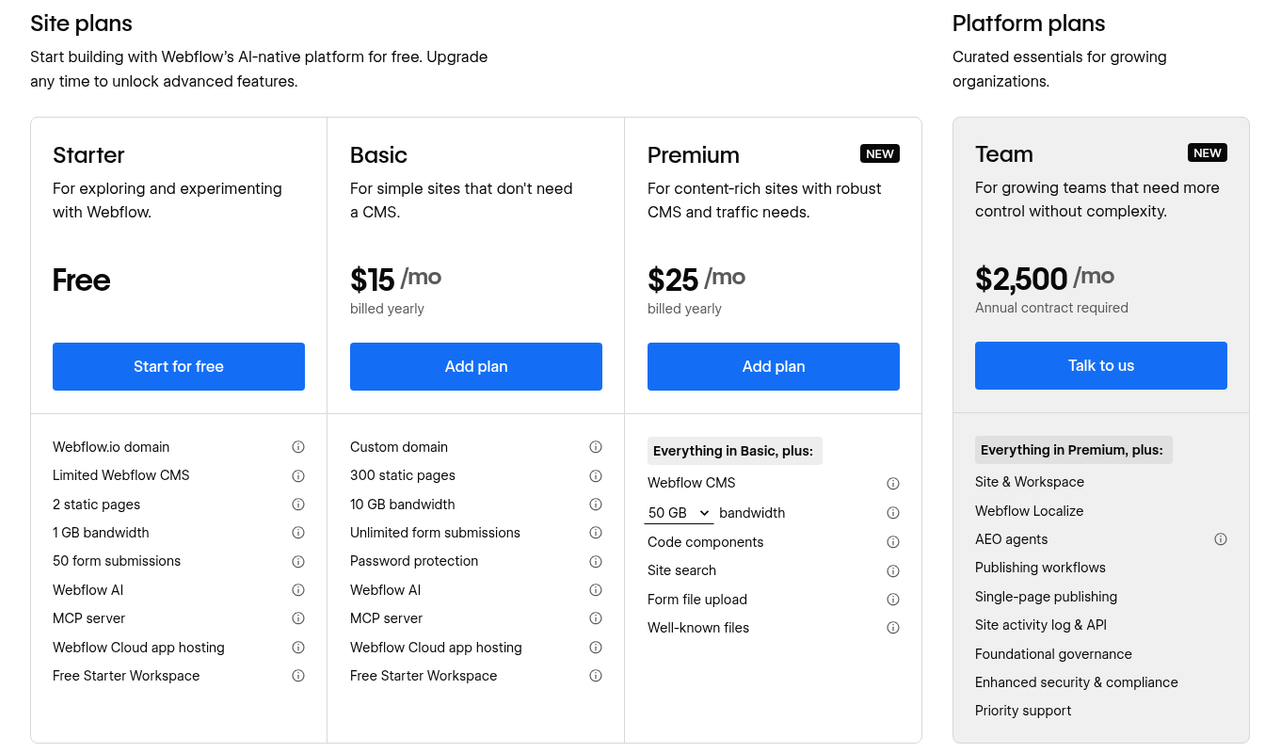
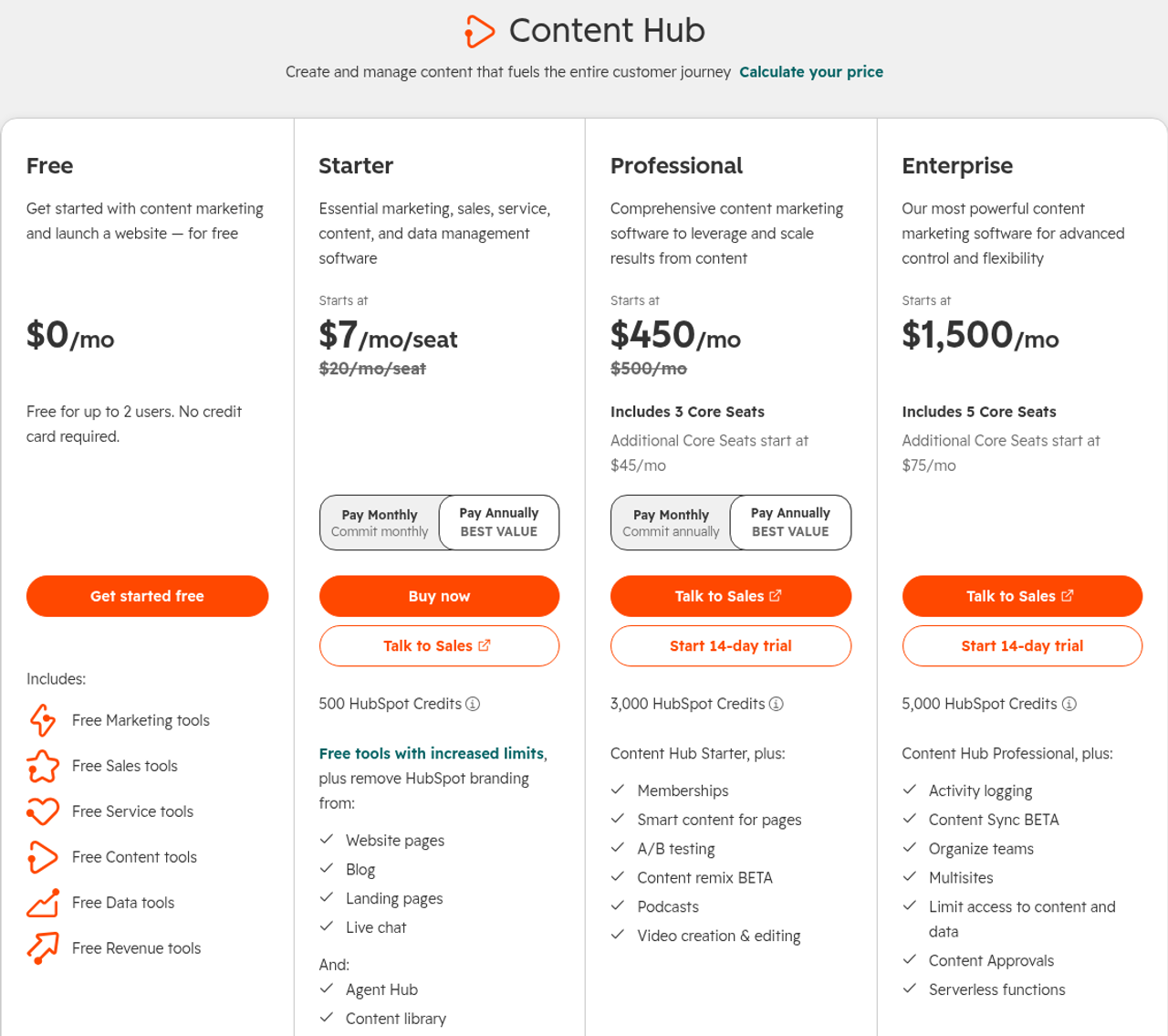
For a typical SaaS website with a blog, Webflow costs around 660 USD per year at list price, HubSpot Content Hub Professional 5,400 USD per year. The two totals cover different scopes: Professional includes personalization and protected pages, which Webflow does not offer in this configuration. You pay for CRM and Marketing Hub in both cases if you use them.
Professional is our comparison plan because a SaaS website with use-case and campaign pages quickly exceeds Starter's 30 website pages, and personalization is only included from Professional. For a small website without personalization, however, Starter is a realistic alternative: with two seats at the regular list price of 20 USD per seat and month, it costs around 480 USD per year and therefore less than Webflow.
Webflow site plans: Premium costs 25 USD per month with annual billing (source: webflow.com/pricing, as of October 16, 2026).
HubSpot Content Hub: Professional from 450 USD per month with three Core Seats, Smart Content and A/B tests. Content approvals are only available in Enterprise (source: hubspot.com/pricing/content, as of October 20, 2026).
The calculation in detail, in USD per month with annual billing, excluding taxes (as of October 20, 2026):
Item
Calculation
Per month
Webflow
Premium site plan
1 × 25 USD
25 USD
Limited seats for two marketers
2 × 15 USD
30 USD
Starter workspace
free
0 USD
HubSpot app
free
0 USD
Total Webflow
25 + 30 + 0 + 0 USD
55 USD = 660 USD per year
Webflow with testing and a second language
Webflow as above
55 USD
55 USD
Optimize
1 × 299 USD
299 USD
Localize Essential
1 × 9 USD
9 USD
Total
55 + 299 + 9 USD
363 USD = 4,356 USD per year
HubSpot Content Hub Professional
Base price including three Core Seats
1 × 450 USD
450 USD = 5,400 USD per year
HubSpot Content Hub Starter (small website)
Two seats at the regular list price
2 × 20 USD
40 USD = 480 USD per year
According to Webflow's help center, Limited seats can be added on any workspace plan, including the free Starter plan. With HubSpot, Professional costs 500 USD with monthly billing, and each additional Core Seat starts at 45 USD per month. Starter is currently offered to new customers as a promotion from 7 USD per seat and month.
Webflow seats: a Limited seat for editing content costs 15 USD per month with annual billing (source: webflow.com/pricing, as of October 16, 2026).
Why this matters for your team: The difference of around 4,700 USD per year compared with Professional does not matter if you really use HubSpot's personalization. If you do not need it, Professional mostly means paying for features that go unused. We explain in detail how Webflow plans and seats add up in our article Webflow Pricing.
Advantage for B2B SaaS marketing: Webflow compared with Professional, as long as you do not need Optimize. For very small websites, HubSpot Starter is cheaper.
Which system is right for your team?
Decide based on whether your website mainly generates leads or delivers content from CRM data. In the first case, Webflow with HubSpot as the CRM is the right fit, in the second HubSpot Content Hub.
Choose HubSpot if …
Smart Content or protected pages for customers are central to your marketing.
your team uses Marketing Hub Professional heavily and wants everything in one system.
your theme's modules are enough for new pages.
nobody should have to maintain a second platform and the form setup.
you need many language versions at no extra cost.
Choose Webflow if …
your marketing team regularly needs new building blocks and does not want to wait for developers.
the website should clearly set your brand apart from competitors.
HubSpot remains your CRM and the website mainly generates leads. That is the third option: Webflow with HubSpot as the CRM.
you do not use Smart Content, or only on the side.
you use a CRM other than HubSpot.
If something on both lists applies to you, page types and responsibilities are usually not settled yet. In that case, it helps to define the website's structure first and choose the platform afterwards.
Conclusion: Webflow for the website, HubSpot for CRM and personalization
For most B2B SaaS teams with HubSpot as their CRM, we recommend Webflow for the website and HubSpot for contacts and automation. New building blocks are created without HubL development, and the platform costs a fraction of Content Hub Professional. HubSpot Content Hub is the better choice when Smart Content or protected customer areas are central to your marketing.
Before you commit, check the route into the CRM: which forms and tools create contacts and when the tracking code loads. Once these points are clear, the choice of platform is usually quick.
Frequently asked questions about Webflow vs. HubSpot
Do we need HubSpot Marketing Hub if the website runs on Webflow?
No. For forms that feed the CRM, a HubSpot account is enough, because embedded HubSpot forms and connected Webflow forms do not require a paid plan. You need Marketing Hub for automation such as email sequences or lead scoring, and the Professional edition also for the fully customizable developer embed of HubSpot forms. So check first which forms and automations your team actually uses.
Can we keep HubSpot landing pages and run only the website on Webflow?
Yes, for example with campaign landing pages on a separate subdomain in HubSpot and the main website on Webflow. The downside is two systems with two design versions that your team has to maintain in parallel. That makes sense as a transition, but rarely pays off as a permanent solution, because every design change has to be made twice.
How much work is switching from HubSpot CMS to Webflow?
Your CRM with all contacts and workflows stays in HubSpot. Only pages and blog need to move, and according to the HubSpot Knowledge Base they can be exported as HTML. Most of the work comes from features HubSpot handled on the website along the way, such as Smart Content or HubDB tables, and you set up the redirects for the old URLs again in Webflow. With us, the migration is part of the relaunch, which starts at 20,000 € net.
Who owns the website when we work with Webflow?
With us, the workspace and site plan are registered to your company, and you pay Webflow directly. You can export CMS content as CSV at any time, and the website's code from the Core workspace plan. This also keeps the website and the CRM contractually separate, and a later switch of CRM vendor leaves the website untouched.
What are the alternatives to Webflow and HubSpot?
WordPress, Framer, Wix and Squarespace are also often compared. You can find the direct comparisons in Webflow vs. WordPress, Webflow vs. Framer, Webflow vs. Wix and Webflow vs. Squarespace. Which platform suits your team mainly depends on how many new building blocks your marketing team builds itself and how closely the website needs to be connected to the CRM.
About the author
Tarik Yayla
Founder @ path digital
Tarik founded path digital with a clear conviction: a good B2B SaaS website starts with strategic positioning. Together with his team, he combines clear messaging, design and Webflow to help companies develop their websites with purpose. Away from website relaunches, he trains for marathons and explores how AI is changing agency work.
In at least seven client projects since 2025, a HubSpot account sits behind the Webflow website, from demo forms to meeting bookings. As a Webflow Enterprise Partner, we build the website and set up the route into the CRM so that every inquiry arrives with its source. In a strategy call, we look at your stack and will also tell you if HubSpot is the better choice for you.
We use cookies and similar technologies to understand how our website is used and improve our website and advertising. You choose which optional cookies to allow. Read our privacy policy
Cookie & storage details
Provider of this website: path digital. No analytics storage is created by scrolling or opening these details. Optional analytics can be declined without restricting the website.
Necessary: your choice
Name / technology
pd_consent_v2 · Local Storage
Provider / purpose
path digital: remembers your consent or rejection after you make a choice.
Duration
Valid for 180 days. We ask again after expiry. Browser storage remains until replaced or deleted.
Necessary: selected language
Name / technology
pd_language · Cookie
Provider / purpose
path digital: remembers German or English only when you explicitly use the language selector. Overrides browser preference on a later direct homepage visit.
Duration
180 days; replaced when you select another language.
Reach measurement without storage: PostHog
Provider: PostHog Inc., USA; EU hosting. Without statistics consent, we count page views, CTA clicks and booking steps and measure load times (Core Web Vitals) cookieless: nothing is stored on your device, and PostHog derives a daily changing, non-reversible identifier on its servers from IP address and browser data. No session recordings or form contents.
Optional: PostHog statistics
With statistics consent, PostHog also uses random visitor and session identifiers in your browser so that visits across several pages and days can be understood together.
Name / technology
ph_phc_u1gZuicUCym1nXYZNBjF0d7KMZm2LnAiHKU30HoiYVk_posthog · Local Storage / Session Storage
Duration
Local Storage has no automatic browser expiry; removed on withdrawal or when expired consent is detected on a visit. Session Storage lasts for the tab session.
Tab identifier
ph_phc_u1gZuicUCym1nXYZNBjF0d7KMZm2LnAiHKU30HoiYVk_window_id · Session Storage · Distinguishes tabs during a session; removed on withdrawal.
Consent marker
__ph_opt_in_out_phc_u1gZuicUCym1nXYZNBjF0d7KMZm2LnAiHKU30HoiYVk · Local Storage
Purpose / duration
Records the SDK opt-in after statistics consent, without a visitor identifier. Removed on withdrawal.
Marketing: Google Ads
Google Ireland Limited, Ireland; processing may also take place in the USA. Measures advertising performance and confirmed bookings and supports advertising attribution. Requires marketing consent. Google Analytics is not used.
_gcl_au, _gcl_aw
Advertising and click attribution · cookies · up to 90 days. The conversion linker requires marketing consent.
Meta Platforms Ireland Limited, Ireland; processing may also take place in the USA. Measures advertising performance and confirmed bookings, and supports remarketing. Requires marketing consent.
_fbp
Browser identifier · cookie · up to 90 days.
_fbc
Associates an ad click with later actions · cookie · up to 90 days; only when an ad click identifier is available.
LinkedIn Ireland Unlimited Company, Ireland; processing may also take place in the USA. Advertising attribution, audience analysis and remarketing. Requires marketing consent.
li_gc
Stores LinkedIn consent · cookie · 6 months.
bcookie
Browser identifier · cookie · 1 year.
lidc
Routes LinkedIn requests · cookie · 1 day.
UserMatchHistory, AnalyticsSyncHistory
Advertising attribution and identifier synchronization · cookies · 30 days.
Snitcher B.V., Netherlands. Identifies companies visiting this website based on the IP address and evaluates their visits. If you enter your email address in one of our forms (booking, download, website audit), Snitcher links it to your visits on this website, including earlier ones, so we can see which pages you viewed. Without marketing consent Snitcher only records the current visit, with no lasting identifier; recognising returning visits and linking your email address require marketing consent.
snitcher_device_id / radar_device_id
Recognizes returning visitors · cookie and Local Storage · 1 year.
snitcher_session / radar_session
Associates page views with a visit · Local Storage · current visit.
snitcher_sn_* / radar_sn_*, spotter_data
Technical visit data for company identification · Session Storage · tab session.
Dealfront Group GmbH, Germany. Identifies companies visiting this website based on the IP address and evaluates their visits. Without marketing consent Leadfeeder only records the current visit and sets no cookie; recognising returning visits requires marketing consent.
_lfa
Recognizes returning visitors · cookie · 1 year; set only after marketing consent.
_lfa_consent, _lfa_test_cookie_stored
Consent marker and cookie support check · cookie · up to 1 year.
Google Tag Manager loads these services only after the corresponding choice. Scrolling does not count as consent. Cookie lifetimes may be shortened by browser settings. Depending on sign-in state and browser restrictions, providers may also use their own domain cookies; their tables above list the details. Withdrawal stops future loading and removes accessible tracking storage on our domain. Cookies on other domains can be deleted in your browser settings.
To withdraw, open “Privacy settings” in the footer and choose “Necessary only”. Further information on processing and your rights: Privacy policy · PostHog Privacy