For B2B SaaS teams with a growing content program, Webflow is the more sustainable choice in most cases. Framer is a better fit when a small, design-driven team needs a website with a manageable amount of content, fast. The monthly price rarely settles the question, because both tools cost about the same for a typical team.
We are a Webflow Enterprise Partner and build our clients' marketing websites with Webflow. So that you can check our assessment, every number in this comparison is backed by a vendor source as of October 2026, and we say openly where Framer is the better choice.
Webflow vs. Framer at a glance
Both tools host a B2B marketing website with a CMS and reusable components, and both cover the SEO basics. The main differences are how much content they can handle without workarounds and how the work is split between design and marketing. The table shows, for each criterion, which tool comes out ahead for B2B SaaS marketing and under which condition.
Comparison table for B2B SaaS marketing
Criterion
Webflow
Framer
Advantage for B2B SaaS marketing
Building pages without developers
Marketer role builds from approved components
Editors build freely on the canvas
Framer if a designer builds; Webflow if marketing builds from building blocks
Design and components
Class system close to CSS, steeper learning curve
Figma-like canvas, quick to learn
Framer for free-form design; Webflow for consistency across many pages
Roles and approvals
Full and Limited seats; staging via webflow.io, page branching only in the Team plan
Editor and Content Editor; branches with preview in the Pro plan
Framer for small teams that need reviews
CMS and content volume
Premium: 40 collections, 20,000 items
Pro: 10 collections, 2,500 items; with add-ons up to 40 and 40,000
Webflow for a large content program
SEO and page speed
SEO basics; redirects in Basic and Premium; 300 static pages
SEO basics; redirects from Pro; 150 pages in the Pro plan
Tie; Webflow for many pages
Integrations and AI
CMS API, MCP server, app marketplace
Plugins, MCP server, Server API in open beta
Tie for AI via MCP; Webflow for ongoing data imports
Multilingual sites
Localize from 9 USD; translated URLs from 29 USD
20 USD per language; page paths can be translated
Tie; Framer cheaper for translated URLs
Ongoing costs (example)
around 64 USD per month
around 70 USD per month
Tie
Operations and switching later
hosted; code export as a static template without CMS content and forms
hosted; no HTML export, CMS export via plugin
Tie
Quick recommendation by starting point
If you need this
better fit
A designer builds and maintains the website on their own
Framer
Few pages, small blog, fast launch
Framer
Branch previews for reviews without the Webflow Team plan
Framer
Marketing builds landing pages from fixed building blocks
Webflow
A growing content program that goes beyond the blog
Webflow
Pulling content into the CMS from other systems via API on an ongoing basis
Webflow
Editing CMS content and pages with AI tools
both, each via MCP
Website in German and English
both, choose based on the other rows
Webflow and Framer in detail: nine criteria compared
The nine criteria follow the questions a SaaS marketing team asks in day-to-day work, from building a new landing page to the monthly bill. Each criterion ends with our assessment of which tool comes out ahead for B2B SaaS marketing and under which condition.
Building pages without developers
In both tools, your marketing team can build and publish new pages without opening a ticket with engineering. The difference lies in the roles. In Framer, editors with design permissions create new pages and components, while content editors maintain CMS content and on-page text (Framer Help on roles). Webflow adds a role in between, the Marketer: it assembles new pages from components the design team has approved, without deviating from the design system (Webflow Help on page building). We explain how Webflow works in general in our article What is Webflow.
Why this matters for your team: In our conversations, leads mostly bring up Framer when someone from design is leading the website project and knows Figma well. What really counts, though, is who maintains the website after launch. If the designer will keep building every page, Framer saves time. If marketing should assemble campaign pages on its own without full design rights, Webflow offers the right role for that.
Advantage for B2B SaaS marketing: Framer if a designer builds and maintains the pages. Webflow if your marketing team should build pages from approved building blocks without touching the design.
Design and components
Framer works like a design tool with a free-form canvas, and anyone who knows Figma becomes productive quickly. Zapier's hands-on test reaches the same conclusion. Webflow follows the HTML and CSS box model with classes and takes more time to learn, which Webflow itself admits on its own comparison page.
Why this matters for your team: Webflow's class system takes time at first, but it pays off when many pages need to look the same for years. In our experience, typography and spacing stay more consistent once the design system is set up properly and marketing only builds with it. If you see every page as its own design, you will feel freer in Framer.
Advantage for B2B SaaS marketing: Framer for free-form, highly designed pages. Webflow if the design should stay consistent across many pages.
Roles and approvals
Framer distinguishes between editors at 20 USD and content editors at 10 USD per month. Content editors maintain CMS content and translations and edit text directly on the page, and viewers are free (Framer Help on roles). Staging and branches with preview are included in the Pro plan.
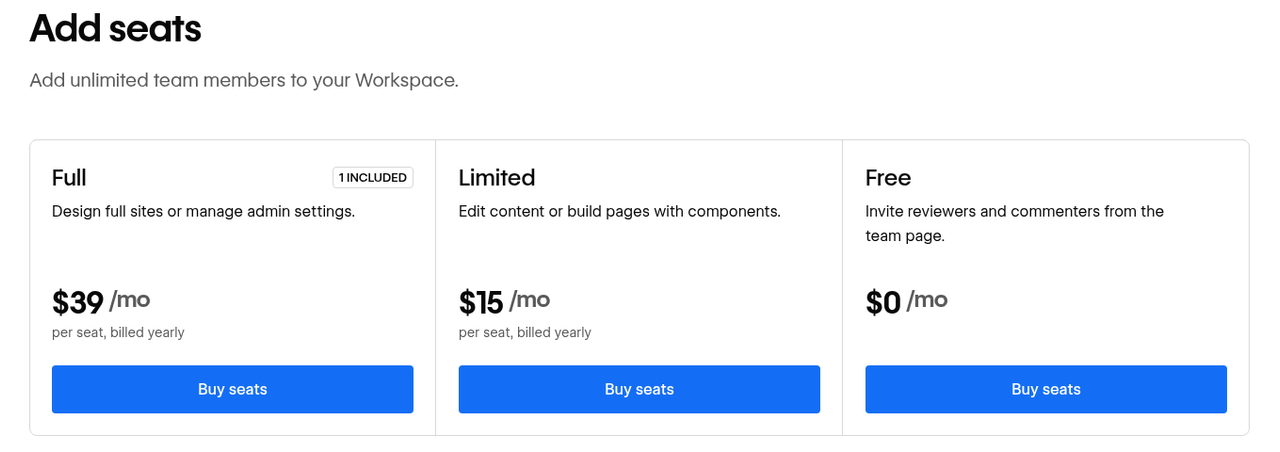
Webflow offers Full seats at 39 USD and Limited seats at 15 USD per month; Limited seats come with the Content Editor and Marketer roles. You can only control publishing rights per site with the Growth workspace plan at 49 USD per month. Page branching is only available in the Team and Enterprise site plans.
Screenshot of the Webflow pricing page: Full and Limited seats in the workspace (as of October 16, 2026). Source: webflow.com/pricing.
Why this matters for your team: For two or three people in marketing, both models are enough. Both offer a staging preview before going live, in Webflow via the webflow.io subdomain. If you want to prepare and approve changes to a page in a separate branch, Framer gives you that at a much lower price. In Webflow, the Growth workspace only pays off once you need to define who may publish on which site.
Advantage for B2B SaaS marketing: Framer for small teams that need reviews, because branches are already part of the Pro plan. Webflow if per-site roles matter more than branches.
CMS and content volume
For a content program that goes beyond a blog, the CMS is the most important difference. A collection is a set of content items with the same structure, such as all blog posts. Webflow Premium includes 40 collections and 20,000 CMS items, Framer Pro 10 collections and 2,500 items.
Plan
Collections
CMS items
Pages
Price per month
Framer Basic
2
1,000
30
10 USD
Framer Pro
10
2,500
150
30 USD
Framer Pro with add-ons
up to 40
up to 40,000
up to 700
30 USD plus add-ons
Webflow Basic
no CMS
no CMS
300 static
15 USD
Webflow Premium
40
20,000
300 static plus CMS pages
25 USD
Framer can be extended: 10 additional collections cost 40 USD and 10,000 additional items cost 20 USD per month (Framer Pricing). Webflow prices apply to annual billing (Webflow Pricing). A SaaS blog with authors, categories, case studies and a glossary quickly needs five or six collections. That fits into Framer Pro, but not into Framer Basic with its two collections.
An example shows what growth costs: A team plans additional content types beyond the blog and case studies, such as a glossary and integration pages, for a total of 12 collections with 6,000 items. In Framer Pro, the team needs one add-on for collections and one for items and pays 30 + 40 + 20 = 90 USD per month. Webflow Premium covers both within the plan for 25 USD per month with annual billing. Seats and languages come on top in both tools.
Why this matters for your team: You usually only hit the limit in year two, once your blog and customer stories have grown. So count the content types and items you expect in two years and compare them against the limit before you decide.
Advantage for B2B SaaS marketing: Webflow as soon as more than 10 content types or several thousand items are on the horizon. For a small blog with few content types, Framer is enough.
SEO and page speed
Both tools cover the SEO basics, such as per-page metadata and a sitemap. In Framer, redirects are only included from the Pro plan up. When it comes to page speed, the same applies to both: third-party tracking and chat scripts are what slow things down most.
Why this matters for your team: Neither tool is better for SEO across the board; the difference comes down to scale. If you want to maintain hundreds of CMS pages with their own template, for example for a glossary or integration pages, you will hit limits sooner in Framer. You add structured data per template in both tools. We explain how to protect your rankings during a rebuild in our article on SEO for a website relaunch.
Advantage for B2B SaaS marketing: Tie. Webflow if you plan hundreds of CMS pages with their own template.
Integrations and AI
Both tools now have their own MCP server for AI tools. Through the Webflow MCP Server, AI tools edit CMS content and page structure. Framer MCP has been available since October 2026 and creates pages and CMS items, optionally in a branch for approval before publishing.
The difference lies in automated data flows without an AI tool. Webflow offers a CMS API and an app marketplace with integrations for CRM and tracking. Framer syncs content via plugins and, since February 2026, via a Server API that updates and publishes content by script, currently still as a free open beta.
Why this matters for your team: If your team wants to edit pages and posts with AI tools, you will get there with either one. If content should flow into the CMS from another system permanently and without manual work, such as integration pages from a product database, a stable API matters more than AI access. So before you decide, test the path from form to CRM and an automated CMS import in both tools.
Advantage for B2B SaaS marketing: Tie for working with AI tools. Webflow for ongoing data imports and integrations, as long as the Framer Server API is in beta.
Multilingual sites
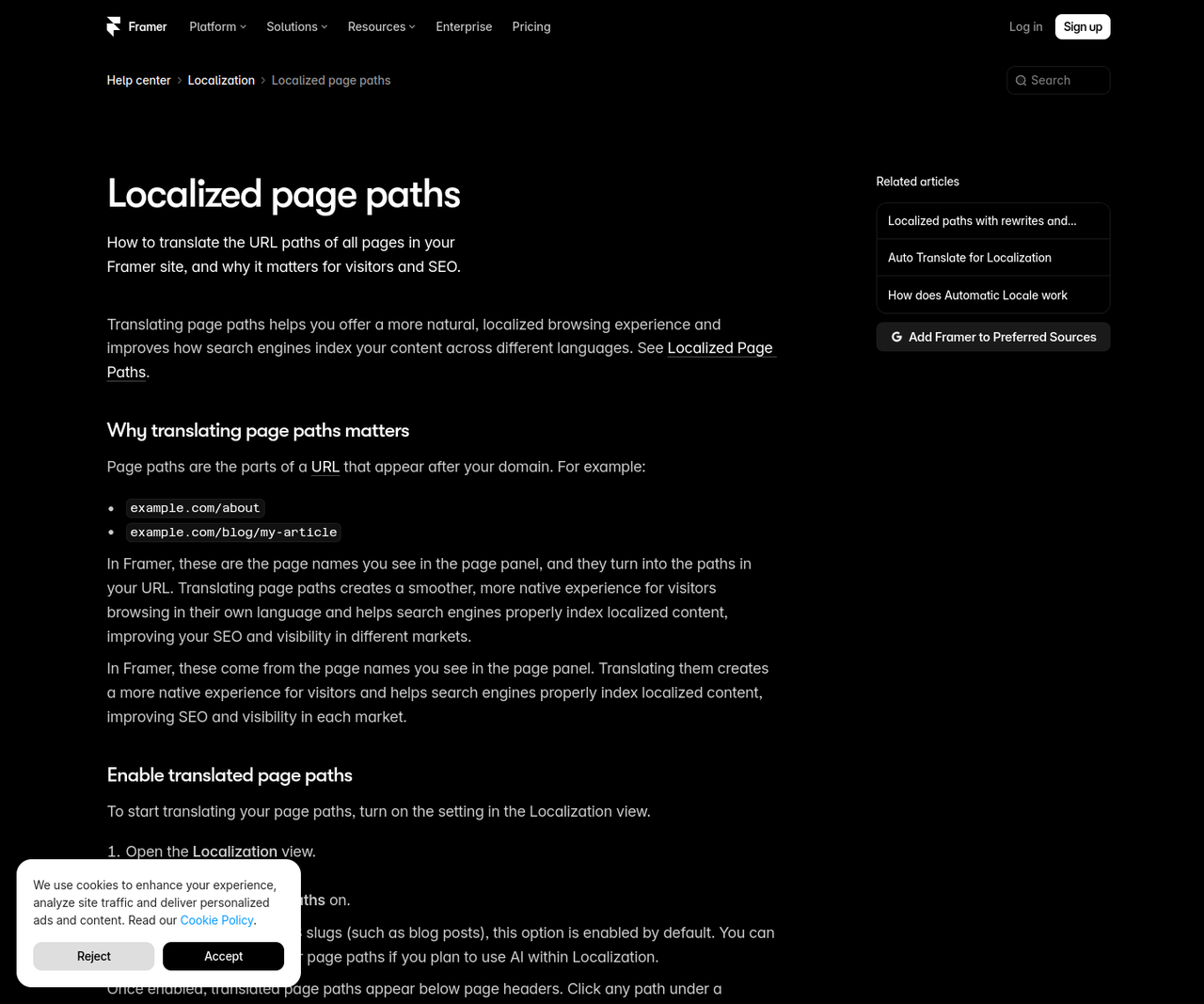
Both tools translate pages and CMS content through a paid add-on with AI translation. Framer charges 20 USD per language per month for up to 20 languages, and page paths and CMS slugs can be translated per language (Framer Help on localized paths). Webflow starts with Localize Essential at 9 USD per month for one additional language. Translated URLs and automatic redirects based on visitor language are only available in Localize Advanced at 29 USD.
Why this matters for your team: For a website in German and English, the two tools are close. If you want translated URLs, such as /en/pricing instead of /en/preise, you pay 20 USD per month with Framer and 29 USD with Webflow. The editorial question usually matters more than the tool: does the English version follow the German one, or is it maintained independently?
Advantage for B2B SaaS marketing: Tie for German and English. Framer is cheaper if you need translated URLs per language.
Ongoing costs
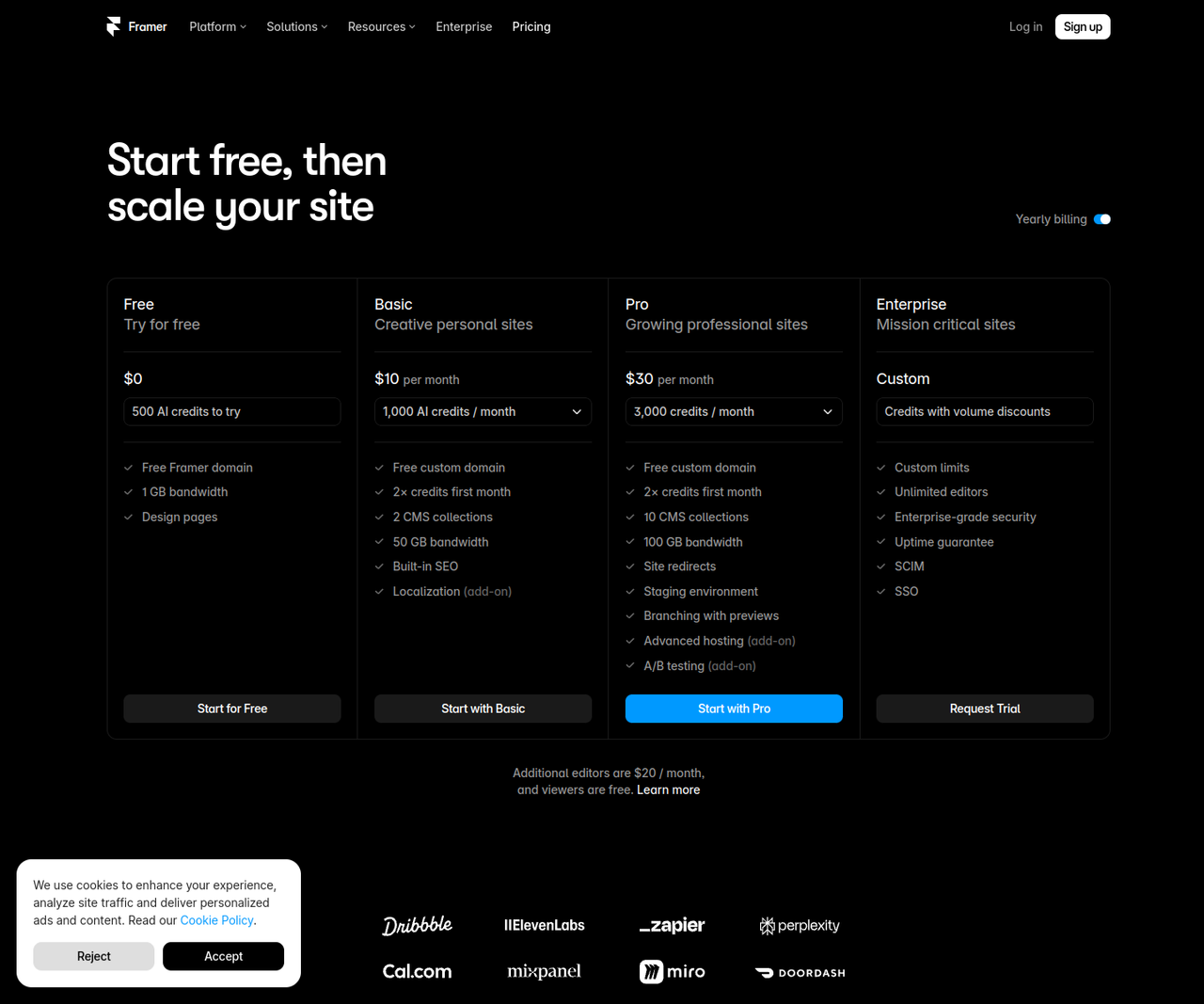
For a typical SaaS team, platform costs for both tools come to around 64 to 70 USD per month. Framer is much cheaper for very small websites, because Basic at 10 USD already includes two collections, while Webflow Basic has no CMS.
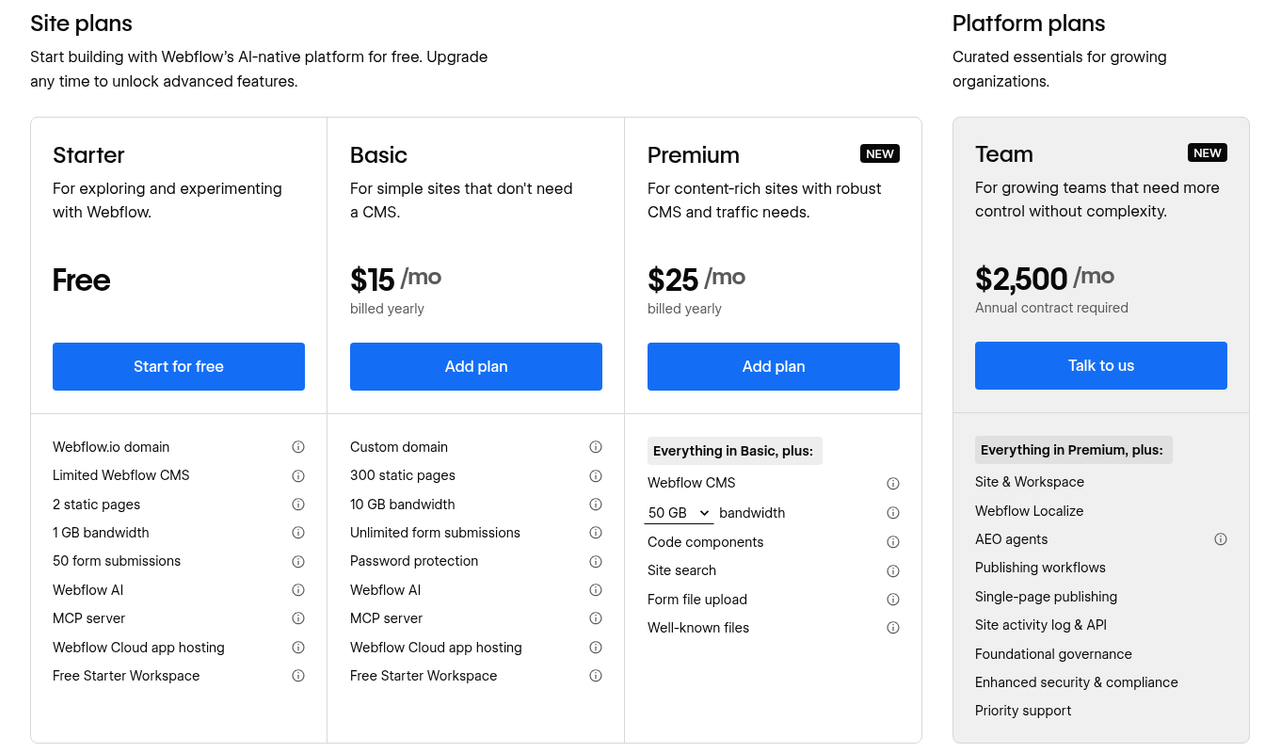
With Framer, you pay for the site plan plus editors and languages depending on your team; the workspace owner and viewers cost nothing. Framer lists all prices as monthly prices and bills according to the cycle you choose at purchase. Webflow separates the site plan from the workspace: The Starter workspace is free, and according to the Webflow Help Center, Limited seats at 15 USD work in every workspace plan. We break down all Webflow plans and seats in our article on Webflow pricing.
Screenshot of the Framer pricing page: Basic at 10 USD and Pro at 30 USD per month, additional editors at 20 USD (as of October 20, 2026). Source: framer.com/pricing.
Screenshot of the Webflow pricing page: site plans with annual billing (as of October 16, 2026). Source: webflow.com/pricing.
Cost example: SaaS team with a blog and an English version
Framer
Webflow
Pro plan: 1 × 30 = 30 USD
Premium plan: 1 × 25 = 25 USD
Content editors: 2 × 10 = 20 USD
Limited seats: 2 × 15 = 30 USD
English language: 1 × 20 = 20 USD
Localize Essential: 1 × 9 = 9 USD
Workspace owner: 0 USD
Starter workspace: 0 USD
Total: 70 USD per month
Total: 64 USD per month with annual billing
Why this matters for your team: A difference of a few dollars will not decide the choice. Framer gets more expensive once CMS add-ons come into play (see the example with 12 collections above), and Webflow gets more expensive when you need translated URLs or additional seats. You only need the Growth workspace for per-site permissions. Project costs for strategy and implementation depend more on scope than on the tool; we cover what drives them in our article on website relaunch costs.
Advantage for B2B SaaS marketing: Tie in the example. Framer for very small websites and for translated URLs, Webflow as soon as Framer needs CMS add-ons.
Operations and switching later
Both tools are hosted platforms where the vendor takes care of hosting and updates, and switching means a rebuild with redirects in both cases. With a paid workspace plan, Webflow exports the code of all pages. CMS content is not included, forms do not work in the export, and it only contains the primary language (Webflow Help on code export). You export CMS content separately as a CSV per collection. According to its own Help Center, Framer offers no HTML export for self-hosting; CMS content can be exported as CSV or JSON via plugins.
For data protection, you sign a data processing agreement with either vendor. Framer B.V. is based in the Netherlands and hosts on AWS (Framer Data Processing Addendum), while Webflow is a US company with its own Data Processing Addendum.
Why this matters for your team: When switching, Webflow's code export serves as a template for layout and styles and is enough for individual static pages without forms. But a website with a CMS and forms will not keep running elsewhere with it, so switching remains a rebuild here too. You are never fully independent with either tool, which is why the structure of your content matters. Cleanly separated collections with clear fields move much more easily in a later switch than text placed directly on the pages.
Advantage for B2B SaaS marketing: Tie. The Webflow export makes the rebuild somewhat easier, but does not replace it.
Which tool fits your team?
Decide based on the team that will maintain the website every day after launch and on the content you expect in two years. The two checklists summarize which tool works for which starting point.
Choose Framer if …
a designer builds the website and keeps maintaining it after launch.
your website consists of a few pages and a small blog.
free-form design and speed at the first launch matter more to you than a deep content structure.
you need branch previews for reviews without booking the Webflow Team plan.
you want translated URLs per language at the lowest price.
Choose Webflow if …
more than 10 content types or several thousand CMS items are on the horizon.
your marketing team should build landing pages from approved building blocks without getting design rights.
content should flow into the CMS from other systems via API on an ongoing basis.
you want to control publishing rights per site centrally.
you plan hundreds of pages with their own template, for example for a glossary or integration pages.
Already on Framer: stay or switch?
Stay with Framer as long as the CMS limits and roles work for your team, because switching always means a rebuild. In our view, a move only pays off when there are concrete signals: CMS limits or add-on costs keep growing, or marketing should build pages from fixed building blocks without the design drifting apart. A good moment to reassess is when maintenance shifts from design to marketing, because that is when the CMS becomes the more important question.
Conclusion: Webflow for growing content programs, Framer for small design teams
Webflow is the better choice for B2B SaaS teams if your content program will grow over the next two years and your marketing team should build pages from approved building blocks. Framer fits if a small team with a designer needs a website with a few pages quickly and has consciously checked the limits. On costs and SEO basics, the two are so close that these points rarely drive the decision. The same goes for a second language.
So first clarify which content types and languages you will need in two years and who should build the pages. With those answers, the choice is usually clear.
FAQ: Webflow vs. Framer
How long does it take a marketing team to learn Webflow or Framer?
Your team can learn to maintain content in either tool after a short introduction. Building new pages freely takes longer in Webflow, because the class system requires more understanding of layout and styles. During handovers, we practice exactly the tasks the team will handle on its own later, such as creating a case study or building a campaign page from components.
Can we switch from Framer to Webflow?
Yes, as a rebuild: You export the CMS content as a CSV via a plugin, import it into Webflow, rebuild the pages and redirect every changed URL, as described step by step in our Webflow migration checklist. In our projects, the content migration itself usually takes only a few hours of work; most of the effort goes into rebuilding the pages and special formats. Since mid-2025, we have rebuilt more than a dozen websites on Webflow with their existing content and URLs.
Can Webflow and Framer be used in a GDPR-compliant way?
Both vendors provide a data processing agreement, which you should sign for your website. Whether your website ends up GDPR-compliant also depends on the subprocessors and the consent setup for tracking and embedded tools. So have your data protection team review the chosen vendor's documents before the website goes live.
Can we combine Framer and Webflow, for example for landing pages?
Technically, yes, via a subdomain or a reverse proxy, and Framer offers Advanced Hosting with rewrites for this. But two systems mean double the maintenance, because components and tracking have to stay identical in both. For most SaaS teams, one system is the better choice, because design and measurement then live in one place.
What are the alternatives to Webflow and Framer?
For B2B SaaS marketing, the main options are WordPress, HubSpot CMS, Wix and Squarespace. WordPress plays to its strengths with many authors and tight product integration (Webflow vs. WordPress), HubSpot CMS with teams that already run their marketing in HubSpot (Webflow vs. HubSpot). Wix and Squarespace are better suited to very small websites (Webflow vs. Wix, Webflow vs. Squarespace).
About the author
Tarik Yayla
Founder @ path digital
Tarik founded path digital with a clear conviction: a good B2B SaaS website starts with strategic positioning. Together with his team, he combines clear messaging, design and Webflow to help companies develop their websites with purpose. Away from website relaunches, he trains for marathons and explores how AI is changing agency work.
If you are torn between Webflow and Framer or considering a switch, we will review your current website and your content plans in a strategy call. Afterward, you will know which system will carry you through the next two years and what a switch would involve.
We use cookies and similar technologies to understand how our website is used and improve our website and advertising. You choose which optional cookies to allow. Read our privacy policy
Cookie & storage details
Provider of this website: path digital. No analytics storage is created by scrolling or opening these details. Optional analytics can be declined without restricting the website.
Necessary: your choice
Name / technology
pd_consent_v2 · Local Storage
Provider / purpose
path digital: remembers your consent or rejection after you make a choice.
Duration
Valid for 180 days. We ask again after expiry. Browser storage remains until replaced or deleted.
Necessary: selected language
Name / technology
pd_language · Cookie
Provider / purpose
path digital: remembers German or English only when you explicitly use the language selector. Overrides browser preference on a later direct homepage visit.
Duration
180 days; replaced when you select another language.
Reach measurement without storage: PostHog
Provider: PostHog Inc., USA; EU hosting. Without statistics consent, we count page views, CTA clicks and booking steps and measure load times (Core Web Vitals) cookieless: nothing is stored on your device, and PostHog derives a daily changing, non-reversible identifier on its servers from IP address and browser data. No session recordings or form contents.
Optional: PostHog statistics
With statistics consent, PostHog also uses random visitor and session identifiers in your browser so that visits across several pages and days can be understood together.
Name / technology
ph_phc_u1gZuicUCym1nXYZNBjF0d7KMZm2LnAiHKU30HoiYVk_posthog · Local Storage / Session Storage
Duration
Local Storage has no automatic browser expiry; removed on withdrawal or when expired consent is detected on a visit. Session Storage lasts for the tab session.
Tab identifier
ph_phc_u1gZuicUCym1nXYZNBjF0d7KMZm2LnAiHKU30HoiYVk_window_id · Session Storage · Distinguishes tabs during a session; removed on withdrawal.
Consent marker
__ph_opt_in_out_phc_u1gZuicUCym1nXYZNBjF0d7KMZm2LnAiHKU30HoiYVk · Local Storage
Purpose / duration
Records the SDK opt-in after statistics consent, without a visitor identifier. Removed on withdrawal.
Marketing: Google Ads
Google Ireland Limited, Ireland; processing may also take place in the USA. Measures advertising performance and confirmed bookings and supports advertising attribution. Requires marketing consent. Google Analytics is not used.
_gcl_au, _gcl_aw
Advertising and click attribution · cookies · up to 90 days. The conversion linker requires marketing consent.
Meta Platforms Ireland Limited, Ireland; processing may also take place in the USA. Measures advertising performance and confirmed bookings, and supports remarketing. Requires marketing consent.
_fbp
Browser identifier · cookie · up to 90 days.
_fbc
Associates an ad click with later actions · cookie · up to 90 days; only when an ad click identifier is available.
LinkedIn Ireland Unlimited Company, Ireland; processing may also take place in the USA. Advertising attribution, audience analysis and remarketing. Requires marketing consent.
li_gc
Stores LinkedIn consent · cookie · 6 months.
bcookie
Browser identifier · cookie · 1 year.
lidc
Routes LinkedIn requests · cookie · 1 day.
UserMatchHistory, AnalyticsSyncHistory
Advertising attribution and identifier synchronization · cookies · 30 days.
Snitcher B.V., Netherlands. Identifies companies visiting this website based on the IP address and evaluates their visits. If you enter your email address in one of our forms (booking, download, website audit), Snitcher links it to your visits on this website, including earlier ones, so we can see which pages you viewed. Without marketing consent Snitcher only records the current visit, with no lasting identifier; recognising returning visits and linking your email address require marketing consent.
snitcher_device_id / radar_device_id
Recognizes returning visitors · cookie and Local Storage · 1 year.
snitcher_session / radar_session
Associates page views with a visit · Local Storage · current visit.
snitcher_sn_* / radar_sn_*, spotter_data
Technical visit data for company identification · Session Storage · tab session.
Dealfront Group GmbH, Germany. Identifies companies visiting this website based on the IP address and evaluates their visits. Without marketing consent Leadfeeder only records the current visit and sets no cookie; recognising returning visits requires marketing consent.
_lfa
Recognizes returning visitors · cookie · 1 year; set only after marketing consent.
_lfa_consent, _lfa_test_cookie_stored
Consent marker and cookie support check · cookie · up to 1 year.
Google Tag Manager loads these services only after the corresponding choice. Scrolling does not count as consent. Cookie lifetimes may be shortened by browser settings. Depending on sign-in state and browser restrictions, providers may also use their own domain cookies; their tables above list the details. Withdrawal stops future loading and removes accessible tracking storage on our domain. Cookies on other domains can be deleted in your browser settings.
To withdraw, open “Privacy settings” in the footer and choose “Necessary only”. Further information on processing and your rights: Privacy policy · PostHog Privacy