For a B2B SaaS marketing website, Webflow is the better choice in most cases. Your marketing team builds pages from a fixed component system without changing the design, and hosting and updates are handled by the platform. WordPress wins when many authors work with approval steps. WordPress is also the stronger option if your website needs specialised plugins or is closely tied to your product.
We build websites with Webflow. That is why we lay out our criteria openly and show where WordPress comes out ahead. The comparison follows the questions a SaaS marketing team asks day to day: Who publishes new pages, what needs maintenance, and what does it cost per year?
Webflow vs. WordPress at a glance
The difference starts with the operating model. Webflow is a platform where hosting and security updates are part of the site plan and pages are built in a visual editor. WordPress is free software that you extend with a theme and plugins and host yourself or have a service provider run. Almost every difference in the table below follows from this basic decision.
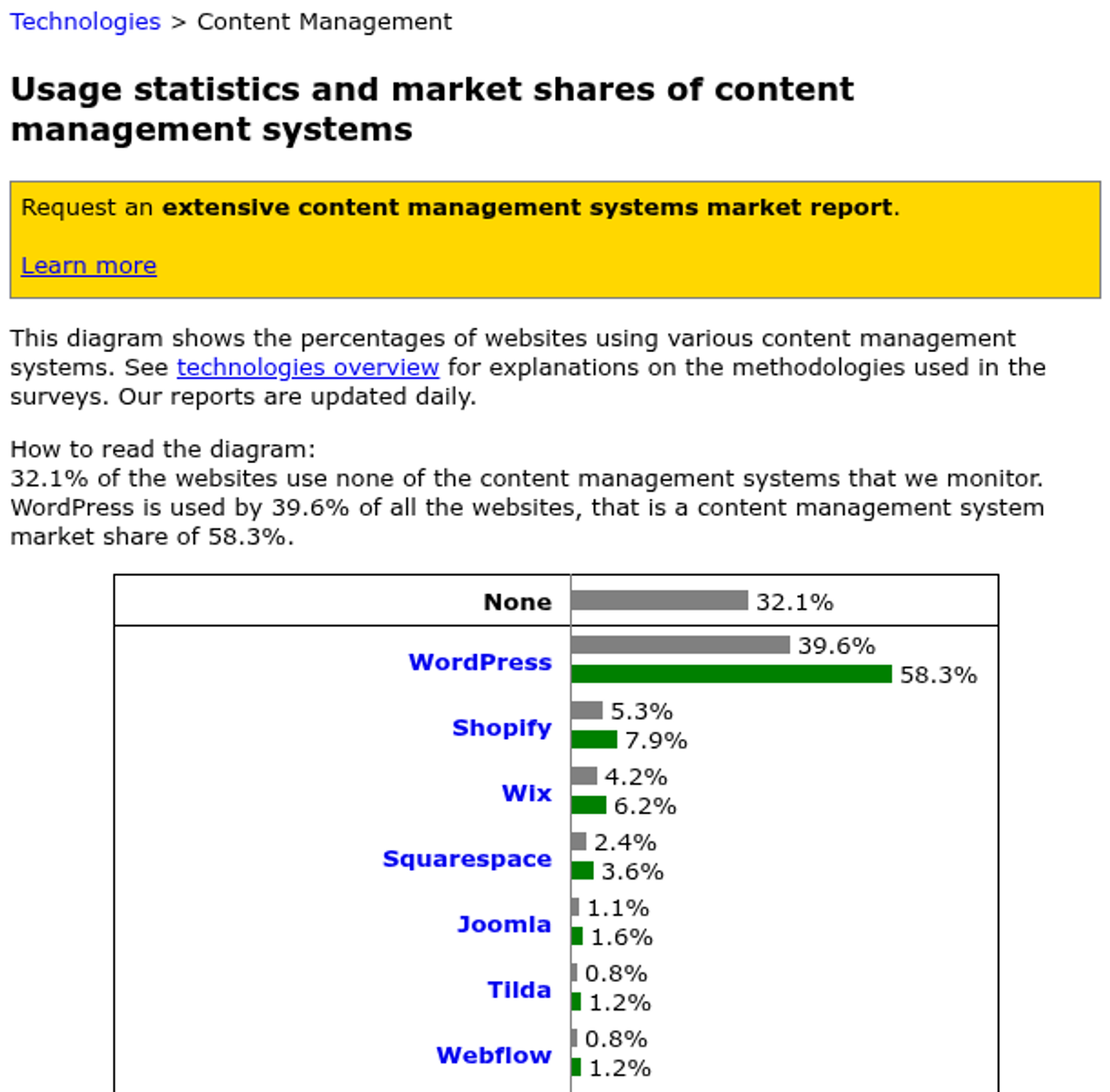
According to W3Techs, WordPress runs on 39.6 % of all websites and Webflow on 0.8 %. This reach explains the large supply of plugins and developers, but it says little about which system fits your marketing team. We explain how Webflow works in general in our article What is Webflow.
Screenshot from W3Techs: share of content management systems across all websites, WordPress 39.6 %, Webflow 0.8 % (as of 20 Oct 2026). Source: W3Techs.
Comparison table for B2B SaaS marketing
Criterion
Webflow
WordPress
Advantage for B2B SaaS marketing
Building pages without developers
Marketing assembles pages from approved components and maintains the CMS itself
Also possible with a block theme and patterns, depends heavily on how the theme is built
Webflow, if the component system is built properly
Design and components
Design system of components, classes and variables in the visual editor, the Marketer role only builds with approved building blocks
Site Editor, templates and patterns, guardrails via theme.json and block locking in the theme
Webflow for a consistent design system
Operations and security
Hosting, SSL, CDN, backups and platform updates included in the site plan
Core, theme and plugins need ongoing updates
Webflow
SEO and load time
Meta data, redirects and sitemap built in, plus CDN and image optimisation
The same via plugins, load time depends on theme, plugin choice and caching
Tie, less maintenance with Webflow
Multiple languages
Localize add-on from 9 USD per month
Plugins such as WPML or Polylang
Tie
Roles and approvals
Per-site roles from the Growth workspace plan, custom roles only on Enterprise
Standard roles from Administrator to Contributor, editorial plugins
WordPress
Plugins and product integration
App marketplace, Data API, integrations for CRM and tracking
Largest plugin ecosystem, headless use via REST API
WordPress
Running costs
Around 660 USD per year with two marketing seats, hosting included
Software is free, plus hosting, premium plugins and maintenance depending on setup
Webflow for predictability, WordPress for entry price
Quick recommendation by starting point
If you already know what your website has to do, this overview gives you a first direction. If more than one row applies to you, give priority to the functions your website cannot do without.
If you need this
Better fit
Marketing builds landing pages itself and the design should stay consistent
Webflow
A well-built block theme with custom patterns is already in use
WordPress, as long as your team works well with it
No budget and no time for ongoing maintenance
Webflow
Many authors with fixed approval steps
WordPress
Functions that only exist as a WordPress plugin, such as a members area
WordPress
Website as a frontend for product data or headless
WordPress or a headless CMS
Website in German and English
Both, decide based on the other rows
Webflow and WordPress in detail: eight criteria compared
The first three criteria are about how independently your marketing team works and how much maintenance the website needs. Webflow leads here, though for the first two only with a well-structured component system. On roles, plugins and product integration, WordPress has the stronger arguments. On SEO and multiple languages, neither system has a clear edge.
Building pages without developers
In Webflow, your marketing team builds new pages from existing components and maintains the blog and case studies in the CMS itself. In WordPress, this also works with a block theme and well-built patterns. How far your team gets there without development depends on the theme and the page builder in use.
In Webflow, this only works if the component system is set up properly and your team has been onboarded. New components remain developer work here too, as does custom code for integrations. A/B tests are not part of the standard package. For that, Webflow offers the Optimize add-on from 299 USD per month.
Why it matters for your team: A campaign page that only goes live in the next developer sprint often arrives after the occasion it was built for. When marketing publishes landing pages and blog posts itself, the team sets its own pace.
Advantage for B2B SaaS marketing: Webflow, provided the component system is built for your team. With a carefully set up block theme, WordPress comes close.
Design and components
With block themes and the Site Editor, WordPress now offers a lot without custom code: you adjust layouts, templates and reusable patterns directly in the editor. How much design freedom editors get is defined by development in the theme, for example via theme.json and block locking.
In Webflow, the design system is built in the visual editor from components, classes and variables. In page building mode, people with the Marketer role assemble approved components into new pages and edit their content. The design system itself stays in the hands of the design team.
So the difference is less about whether marketing can build pages without code and more about where the guardrails are created. In Webflow, the design team sets them up in the same tool it designs in. In WordPress, they live in the theme and its configuration, which someone with development skills maintains.
Webflow does have a learning curve that comes up regularly in software reviews. People who only edit content get to grips with the editor quickly. People who assemble new pages from components need onboarding.
Why it matters for your team: B2B SaaS companies often sharpen their positioning several times a year, for example for a new product or a new target group. A system in which new page variants take little effort keeps the website in step with the company.
Advantage for B2B SaaS marketing: Webflow, if marketing builds many pages itself and the design should stay consistent.
Operations and security
In Webflow, hosting including SSL and CDN is part of the site plan, and Webflow handles backups and platform updates itself. With WordPress, someone has to install updates for WordPress and its plugins and look after the hosting, either in-house or through a maintenance contract.
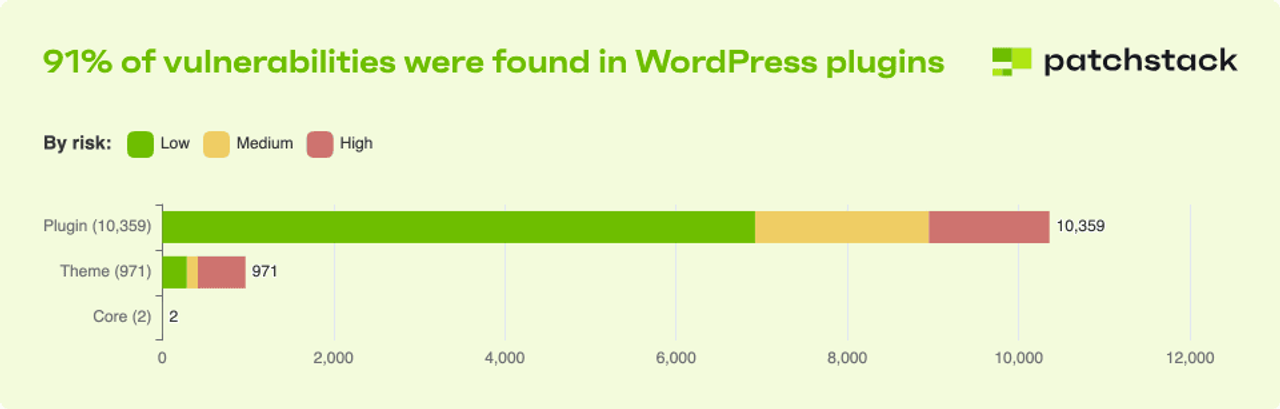
The biggest risk lies in plugins. According to the Patchstack report 2026, 11,334 new vulnerabilities were reported in the WordPress ecosystem in 2025, 91 % of them in plugins. For 46 %, there was no fix at the time of disclosure.
Chart from the Patchstack report 2026: 91 % of the vulnerabilities reported in the WordPress ecosystem in 2025 were in plugins, 9 % in themes. Source: Patchstack.
Your team is not entirely free of duties in Webflow either. You still check your own scripts and form integrations, as well as who has access to the workspace.
Why it matters for your team: Every hour spent on plugin maintenance is missing from campaigns and content. And if nobody on the team owns the updates, the security risk grows without anyone noticing.
Advantage for B2B SaaS marketing: Webflow, especially if nobody on the team can plan time for maintenance.
SEO and load time
You can rank very well with both systems. With a paid site plan, you manage meta data and 301 redirects directly in the Webflow settings, and Webflow generates the XML sitemap automatically. WordPress usually handles the same through an SEO plugin such as Yoast or Rank Math.
The difference lies in the effort it takes to keep load times fast. With WordPress, load time depends mainly on the theme, the plugins in use and how they are configured. Some plugins load their own CSS or JavaScript on every page, others only work in the backend. Good Core Web Vitals therefore need a lean theme, a deliberate choice of plugins and clean caching. Webflow serves pages via a CDN and optimises images. There, it is mainly embedded third-party scripts that cost speed.
Why it matters for your team: Load time affects user experience and therefore conversion. According to an Akamai report, in online retail a delay of just 100 milliseconds can lower the conversion rate by up to 7 %. There is no comparably robust figure for B2B leads.
Advantage for B2B SaaS marketing: Tie. Webflow needs less maintenance to stay fast.
Multiple languages
Both systems can run a website in German and English. Webflow offers the Localize add-on for this, with the Essential tier from 9 USD per month and the Advanced tier at 29 USD per month. Among other things, the tiers differ in the number of possible languages. WordPress handles multiple languages through plugins such as WPML or Polylang.
Why it matters for your team: For a website in German and English, both approaches are proven. With many languages and markets, check in advance which Localize tier you need and what it costs per month.
Advantage for B2B SaaS marketing: Tie.
Roles and approvals
WordPress leads here. Even the standard installation separates roles such as Editor, Author and Contributor: a Contributor can write posts but not publish them, and an Editor can also approve other people's posts. For multi-step editorial processes, there are additional plugins.
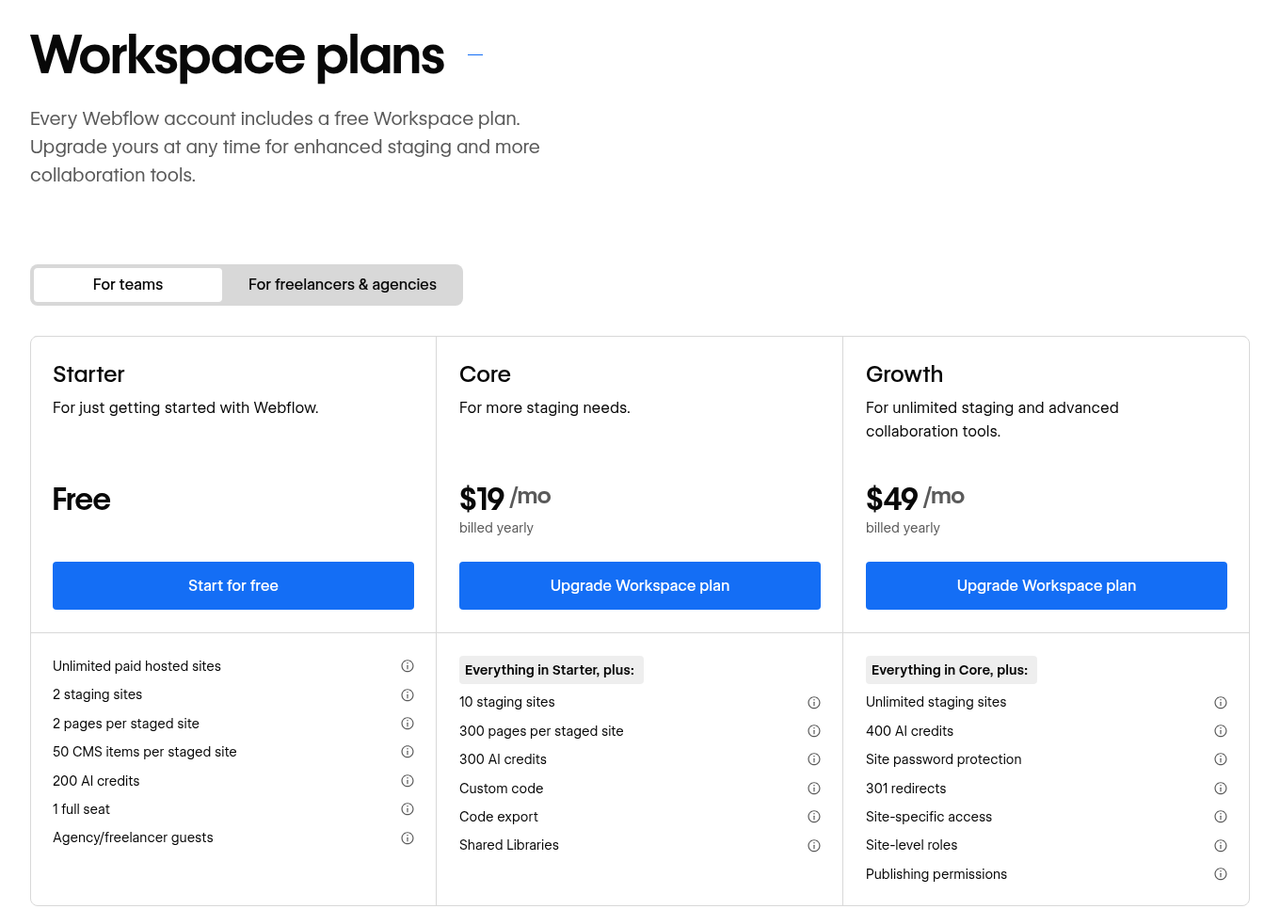
In Webflow, you only set per-site roles and publishing rights with the Growth workspace plan, which costs 49 USD per month. Webflow offers custom roles with fine-grained permissions only to Enterprise customers.
Screenshot of the Webflow pricing page with the workspace plans. Per-site roles are available from Growth (as of 16 Oct 2026). Source: Webflow pricing page.
Why it matters for your team: A content team with many authors and fixed approval steps gets this in WordPress without an extra plan. In our experience, a SaaS marketing team of two to five people rarely needs this level of granularity, because approvals there happen in direct conversation.
Advantage for B2B SaaS marketing: WordPress, once many authors work with fixed approval steps.
Plugins and product integration
WordPress has the largest plugin ecosystem and can be run headless via its REST API, meaning as a pure content backend for a custom frontend. Webflow can be extended through an app marketplace and a Data API and connects CRM and tracking tools. For login areas or shop logic that is tightly linked to your product, Webflow is not the obvious choice.
Why it matters for your team: Demo forms to the CRM and tracking tools work with both systems. But as soon as the website reflects functions of your product, such as a members area or data from your product database, the extensibility of WordPress or a headless CMS becomes more important. If a close connection to the CRM is the priority, HubSpot CMS is also worth a look, which we assess in our comparison Webflow vs. HubSpot.
Advantage for B2B SaaS marketing: WordPress, once the website is more than a marketing website.
Running costs
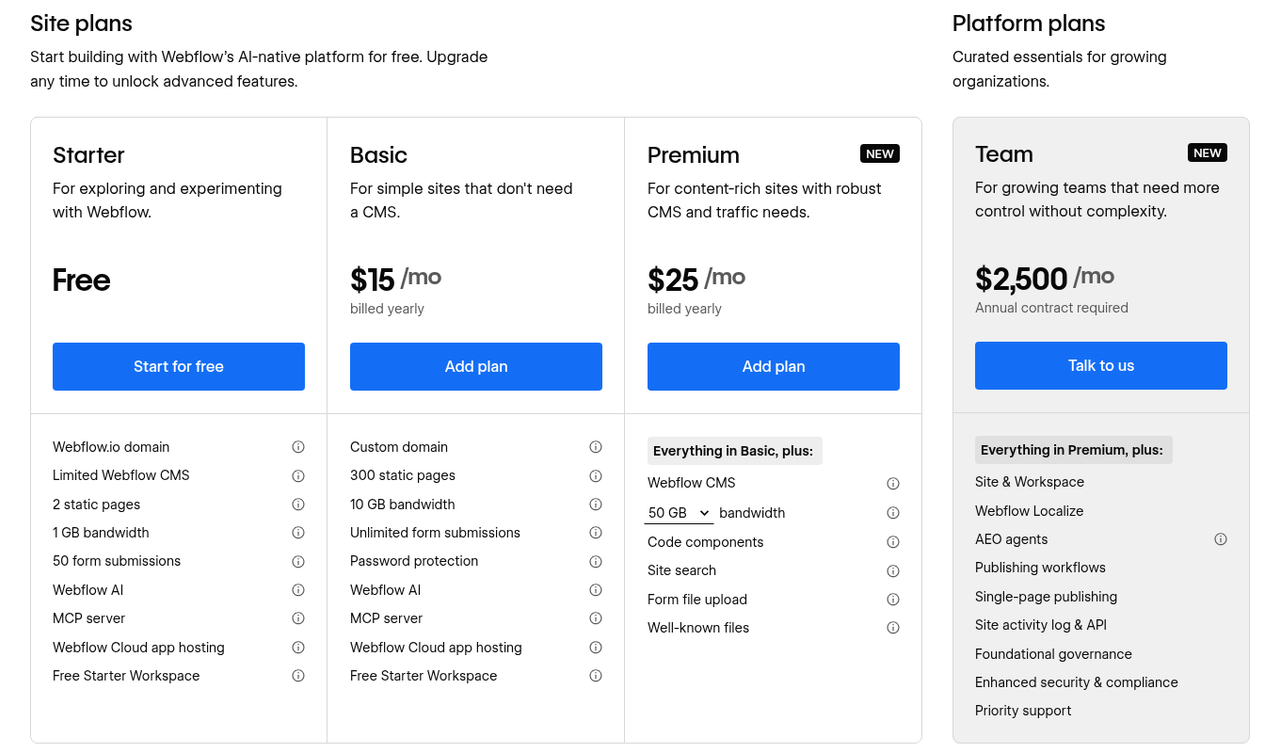
Webflow costs a small marketing team around 660 USD per year plus tax, hosting included. WordPress is free as software. What you pay for is hosting and premium plugins, plus maintenance by your team or a service provider.
How much WordPress costs per year depends almost entirely on the setup: a lean setup on low-cost hosting costs little, managed hosting with a maintenance contract considerably more. You can find the current plans on the Webflow pricing page. We show how site plan, workspace and seats add up in our article Webflow Pricing.
Screenshot of the Webflow pricing page with the site plans (as of 16 Oct 2026, prices rechecked on 20 Oct 2026). Source: Webflow pricing page.
Why it matters for your team: With Webflow, the amount is fixed, and extra costs only come from add-ons or additional seats. With WordPress, the entry point is cheaper, but you have to plan maintenance as an ongoing cost item, even if it happens in-house.
Advantage for B2B SaaS marketing: Webflow for predictability, WordPress for entry price.
Which CMS fits your team?
Decide based on the team that maintains the website every day: Who publishes new pages, and who takes care of maintenance and approvals? The two lists sum up which system holds up in which situation.
Choose WordPress if …
many authors work on your content with fixed approval steps
your website needs functions that only exist as a WordPress plugin
the website is part of your product or should deliver headless content to a custom frontend
you have an experienced WordPress team with time for maintenance
your team already works with a well-built block theme and custom patterns
Choose Webflow if …
your marketing team should build landing pages from approved components without changing the design
nobody on the team has time or budget for ongoing maintenance
your positioning and pages change frequently
your website is a marketing website and does not reflect product functions
you plan a website in German and English with a manageable number of languages
Conclusion: Webflow for the marketing website, WordPress for editorial teams and product proximity
For the typical B2B SaaS marketing website, we recommend Webflow, because your marketing team builds pages from a consistent component system and doesn't have to maintain plugins. WordPress is the better choice when many authors work with fixed approvals, when the website reflects functions of your product, or when a well-built block theme is already in use. On SEO and multiple languages, neither system decides your success.
Frequently asked questions about Webflow vs. WordPress
Can we keep our WordPress blog and only build the website on Webflow?
Technically yes, by keeping the blog running on a subdomain such as blog.yourdomain.com. But then your team maintains two systems with separate maintenance, and every change to design or navigation has to be made in two places. If the blog is an important part of your content strategy, moving it into the Webflow CMS usually pays off.
How much work is it to switch from WordPress to Webflow?
Blog posts and other recurring content move into the Webflow CMS via CSV import or an app. For a blog with consistently structured posts, this import usually takes just a few hours of work in our projects. With hundreds of posts with special formats, many internal links and embedded images, the review alone takes considerably longer. Functions that a plugin used to handle, such as forms or download boxes, add effort, as do redirects from old to new URLs. We show how to plan the move in our article Webflow Migration.
Who owns the website when we work with Webflow?
The workspace and site plan are in your company's name, even if an agency builds the website. In our projects, clients pay for their workspace directly with Webflow. You can export CMS content as CSV at any time, and the page code with a paid workspace plan. Moving to another system is still a project, because the exported code does not contain CMS content.
Do we need an agency for Webflow?
No, Webflow can also be implemented by a freelancer or in-house, if someone has experience with components and CMS structures. An agency pays off mainly if you also rethink positioning and page structure as part of the switch. When choosing, make sure your team can work with the component system itself after launch.
What alternatives to Webflow and WordPress are there?
For B2B SaaS marketing websites, the main options are Framer, HubSpot CMS, Wix and Squarespace. Framer focuses on fast visual design, HubSpot CMS combines website and CRM in one system. Wix and Squarespace are website builders aimed mainly at smaller websites. Our comparisons Webflow vs. Framer, Webflow vs. HubSpot, Webflow vs. Wix and Webflow vs. Squarespace show how they compare with Webflow.
About the author
Tarik Yayla
Founder @ path digital
Tarik founded path digital with a clear conviction: a good B2B SaaS website starts with strategic positioning. Together with his team, he combines clear messaging, design and Webflow to help companies develop their websites with purpose. Away from website relaunches, he trains for marathons and explores how AI is changing agency work.
We use cookies and similar technologies to understand how our website is used and improve our website and advertising. You choose which optional cookies to allow. Read our privacy policy
Cookie & storage details
Provider of this website: path digital. No analytics storage is created by scrolling or opening these details. Optional analytics can be declined without restricting the website.
Necessary: your choice
Name / technology
pd_consent_v2 · Local Storage
Provider / purpose
path digital: remembers your consent or rejection after you make a choice.
Duration
Valid for 180 days. We ask again after expiry. Browser storage remains until replaced or deleted.
Necessary: selected language
Name / technology
pd_language · Cookie
Provider / purpose
path digital: remembers German or English only when you explicitly use the language selector. Overrides browser preference on a later direct homepage visit.
Duration
180 days; replaced when you select another language.
Reach measurement without storage: PostHog
Provider: PostHog Inc., USA; EU hosting. Without statistics consent, we count page views, CTA clicks and booking steps and measure load times (Core Web Vitals) cookieless: nothing is stored on your device, and PostHog derives a daily changing, non-reversible identifier on its servers from IP address and browser data. No session recordings or form contents.
Optional: PostHog statistics
With statistics consent, PostHog also uses random visitor and session identifiers in your browser so that visits across several pages and days can be understood together.
Name / technology
ph_phc_u1gZuicUCym1nXYZNBjF0d7KMZm2LnAiHKU30HoiYVk_posthog · Local Storage / Session Storage
Duration
Local Storage has no automatic browser expiry; removed on withdrawal or when expired consent is detected on a visit. Session Storage lasts for the tab session.
Tab identifier
ph_phc_u1gZuicUCym1nXYZNBjF0d7KMZm2LnAiHKU30HoiYVk_window_id · Session Storage · Distinguishes tabs during a session; removed on withdrawal.
Consent marker
__ph_opt_in_out_phc_u1gZuicUCym1nXYZNBjF0d7KMZm2LnAiHKU30HoiYVk · Local Storage
Purpose / duration
Records the SDK opt-in after statistics consent, without a visitor identifier. Removed on withdrawal.
Marketing: Google Ads
Google Ireland Limited, Ireland; processing may also take place in the USA. Measures advertising performance and confirmed bookings and supports advertising attribution. Requires marketing consent. Google Analytics is not used.
_gcl_au, _gcl_aw
Advertising and click attribution · cookies · up to 90 days. The conversion linker requires marketing consent.
Meta Platforms Ireland Limited, Ireland; processing may also take place in the USA. Measures advertising performance and confirmed bookings, and supports remarketing. Requires marketing consent.
_fbp
Browser identifier · cookie · up to 90 days.
_fbc
Associates an ad click with later actions · cookie · up to 90 days; only when an ad click identifier is available.
LinkedIn Ireland Unlimited Company, Ireland; processing may also take place in the USA. Advertising attribution, audience analysis and remarketing. Requires marketing consent.
li_gc
Stores LinkedIn consent · cookie · 6 months.
bcookie
Browser identifier · cookie · 1 year.
lidc
Routes LinkedIn requests · cookie · 1 day.
UserMatchHistory, AnalyticsSyncHistory
Advertising attribution and identifier synchronization · cookies · 30 days.
Snitcher B.V., Netherlands. Identifies companies visiting this website based on the IP address and evaluates their visits. If you enter your email address in one of our forms (booking, download, website audit), Snitcher links it to your visits on this website, including earlier ones, so we can see which pages you viewed. Without marketing consent Snitcher only records the current visit, with no lasting identifier; recognising returning visits and linking your email address require marketing consent.
snitcher_device_id / radar_device_id
Recognizes returning visitors · cookie and Local Storage · 1 year.
snitcher_session / radar_session
Associates page views with a visit · Local Storage · current visit.
snitcher_sn_* / radar_sn_*, spotter_data
Technical visit data for company identification · Session Storage · tab session.
Local Storage and Session Storage. Stores booking ids that already sent a conversion, so a reload does not count the same call again. No name or email. Written only with marketing consent and kept after withdrawal so a later reload stays deduplicated. Removed when you delete this site’s data.
Google Tag Manager loads these services only after the corresponding choice. Scrolling does not count as consent. Cookie lifetimes may be shortened by browser settings. Depending on sign-in state and browser restrictions, providers may also use their own domain cookies; their tables above list the details. Withdrawal stops future loading and removes accessible tracking storage on our domain. Cookies on other domains can be deleted in your browser settings.
To withdraw, open “Privacy settings” in the footer and choose “Necessary only”. Further information on processing and your rights: Privacy policy · PostHog Privacy